QVeris
运行任务
QVerisGuide

9 Best MCP Clients for AI Agents in 2026

Compare 9 MCP clients for workflow and production readiness.

TL;DR
  • Closest default choice: Claude Desktop suits general desktop work; Claude Code suits terminal automation; Cursor or VS Code suits teams that want MCP inside the editor.
  • Compare operating controls: Verify local stdio and remote Streamable HTTP support, OAuth behavior, tool approvals, logs, configuration scope, and enterprise policy.
  • Production rule: Run the same test server and task set in every candidate. A client that connects is not automatically safe under auth failures, malformed outputs, retries, and long-running tool calls.

MCP Client, Host, and Server: Know the Difference

An MCP client is the protocol component inside an AI host that connects to MCP servers. Products such as Claude Desktop, Cursor, and VS Code are usually hosts; each host can create one or more client connections to servers that expose tools, resources, and prompts.

Search results often call the whole application an “MCP client.” That shorthand is useful for product comparison, but the distinction matters when debugging: the host owns the user experience and model loop, the client owns protocol exchange, and the server owns the capability implementation.

The current MCP specification defines JSON-RPC messages between hosts, clients, and servers. Compatibility still depends on which protocol version, transport, authorization flow, and optional features each product actually implements.

A serious comparison therefore tests more than “supports MCP.” It checks server discovery, local process management, remote authentication, tool approval, error visibility, configuration scope, and what happens when a server disappears during a call.

Choose the host around the workflow you need—desktop research, terminal automation, IDE coding, or an embedded product. Then verify the same MCP server against that host before standardizing a team configuration.

Architecture and Transport Requirements

Terminology used in this comparison: “MCP client” means the user-facing host product when discussing Claude Desktop, Cursor, or VS Code. When behavior differs at the protocol layer, this guide uses the precise host, client, and server terms from the specification.

The host controls model access, consent prompts, conversation state, and user-facing errors. Its internal MCP client negotiates capabilities and exchanges messages. The MCP server exposes tools, resources, or prompts. A weak host can make a correct server feel unreliable, so failures must be isolated by layer.

For local integrations, stdio lets the host launch a server as a subprocess. For remote services, Streamable HTTP is the standard path. Legacy HTTP+SSE may still appear during migration, but new deployments should not assume every client supports it equally.

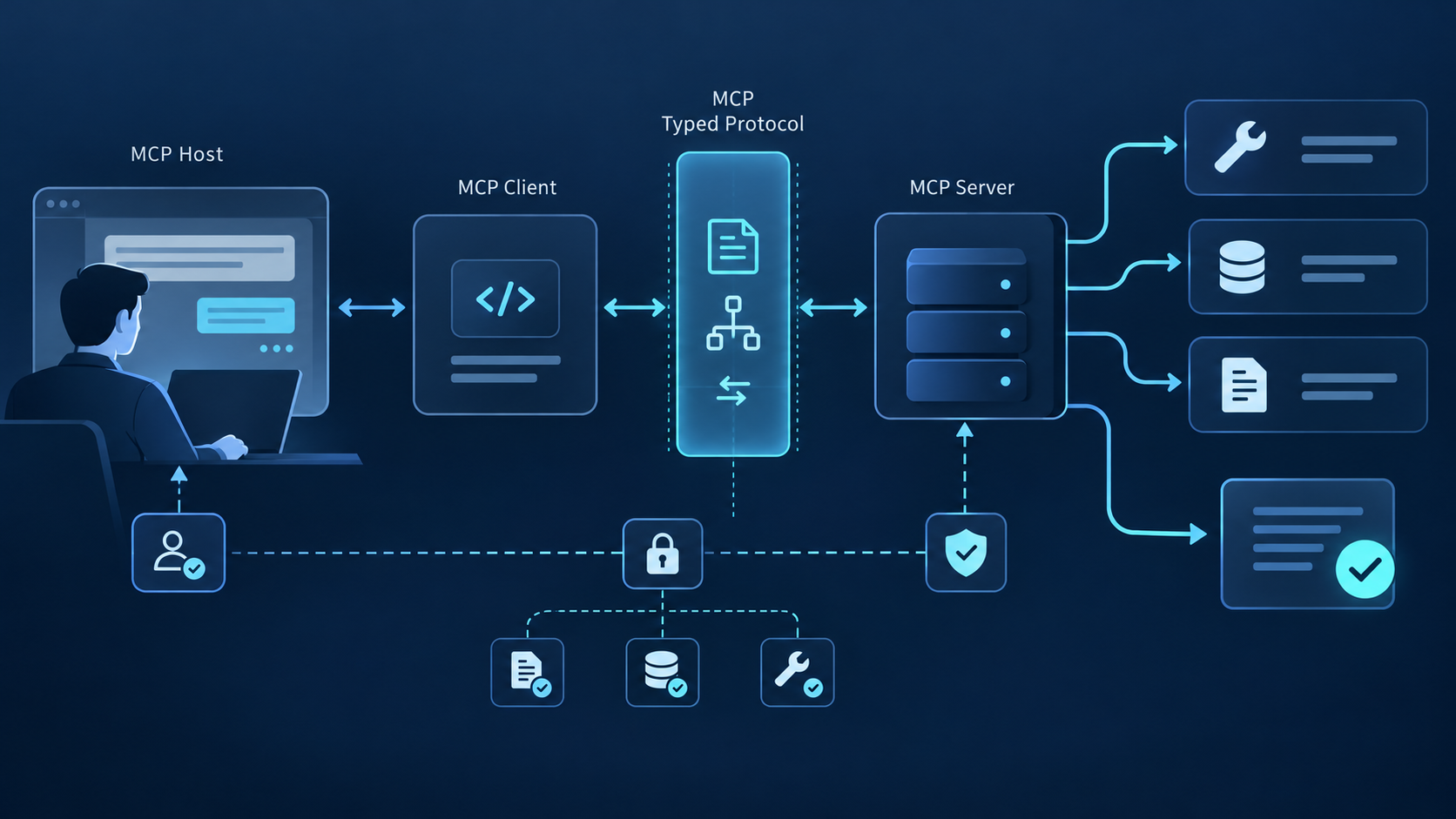
Three-layer MCP host, client, transport, and server architecture

The Three Layers

  • Host: The AI application you interact with — Claude Desktop, Cursor, Claude Code, Cline, or any MCP-compatible tool. The host exposes the user interface and coordinates the AI's reasoning.
  • Client: A component inside the host that manages communication with MCP servers. Each client maintains a connection to one or more servers, handling protocol negotiation, tool discovery, and message exchange. A single host can run multiple clients simultaneously.
  • Server: The capability provider — a service that exposes tools, resources, and prompts to clients. Servers can be public (like the QVeris MCP server with 10,000+ capabilities) or custom-built for specific integrations.

Transport Protocols

MCP uses JSON-RPC as its messaging format over two active transport options, enabling bidirectional tool calling between clients and servers:

  • stdio: The most widely supported transport. Communication happens over standard input/output — ideal for local integrations and CLI-based MCP clients like Claude Code.
  • Streamable HTTP: The newer standard, replacing the deprecated SSE transport. Supports bidirectional streaming over HTTP, better suited for cloud deployments and remote MCP servers.
  • SSE (deprecated): Server-Sent Events was an earlier transport option. Current implementations should use Streamable HTTP instead.
2026-07-28 specification update. The new MCP core is stateless: the initialization handshake and protocol-level session are removed, Streamable HTTP requests can be routed without sticky sessions, and tool-list responses can advertise cache lifetimes. Tasks and MCP Apps now live in the Extensions framework, while Roots, Sampling, and Logging are deprecated. Client support will roll out at different speeds, so negotiate the protocol version and test both the 2025-11-25 and 2026-07-28 paths during migration.
2026-07-28 规范更新。 新版 MCP 核心改为无状态:移除了初始化握手和协议级 Session, Streamable HTTP 请求无需粘性会话即可路由,工具列表响应也可以声明缓存周期。 Tasks 与 MCP Apps 被纳入 Extensions,Roots、Sampling 和 Logging 则进入弃用阶段。不同客户端的支持进度不会一致,迁移时应协商协议版本, 并同时验证 2025-11-25 与 2026-07-28 两条兼容路径。

Early adopters including Block, Apollo, Zed, Replit, and Sourcegraph have integrated MCP into their development environments since the protocol's announcement. This client-server architecture means their MCP clients can connect to any MCP server that implements the protocol — enabling a growing ecosystem of capability providers.

The 9 Best MCP Clients in 2026

This shortlist covers the main product shapes developers compare: desktop assistant, terminal agent, AI IDE, editor extension, and open-source runtime. “Best” means best fit for a stated workflow; support depth and configuration details can change by release.

Nine MCP clients compared by operating model and strongest use case
Client Type Interface Best fit / verify
Claude Desktop Desktop app GUI Desktop research; verify remote auth and team policy
Claude Code CLI Terminal Terminal automation; verify scopes and unattended use
Cursor AI IDE GUI AI-first coding; verify project/user config behavior
Windsurf AI IDE GUI AI IDE workflows; verify transport and tool limits
Cline VS Code extension GUI Agentic VS Code work; verify approvals and checkpoints
Continue IDE extension GUI Configurable IDE use; verify current MCP feature depth
Goose Open-source agent CLI/GUI Open-source desktop/CLI; verify extension permissions
VS Code MCP Editor-native client GUI Managed teams; verify trust, policy, and sandbox support
OpenCode Open-source IDE GUI Open-source terminal/IDE users; verify remote auth

1. Claude Desktop

Type: Desktop App Recommended Interface: GUI

Claude Desktop is the clearest default for people who want MCP inside a general-purpose desktop assistant. Its strength is the complete conversational workflow around tools, resources, and approvals. Confirm the exact remote-server and organization controls available on your plan before a team rollout.

Choose it when: people work primarily in chat and need visible approval before tools act. Test server startup, authentication renewal, tool-list size, and recovery after a failed call. Review Anthropic's MCP documentation →

2. Claude Code

Type: CLI Interface: Terminal

Claude Code is the strongest fit when the terminal is the main workspace. It supports local stdio and remote connections, with project, user, and local configuration scopes. That makes it easier to version shared server definitions without silently sharing every developer credential.

Choose it when: developers need repeatable CLI workflows, explicit scope control, and inspectable server status. Treat CI use separately: decide which calls may run unattended and keep secrets outside committed configuration.

3. Cursor

Type: AI IDE Recommended Interface: GUI

Cursor combines codebase-aware agent work with MCP server access in the same editor. Its value is reduced context switching: tools can participate in planning and implementation while the developer stays inside the repository.

Choose it when: your team already standardizes on Cursor. Verify whether each server is configured globally or per project, how OAuth state is stored, and whether tool logs are sufficient for incident review. Review Cursor's MCP documentation →

4. Windsurf

Type: AI IDE Interface: GUI

Windsurf exposes MCP tools inside its agentic coding workflow. It is a practical candidate for teams already using Cascade and wanting external systems available without leaving the IDE. Because product ownership and documentation routes have changed, validate current setup behavior against the live documentation.

Choose it when: Cascade is already the team's primary agent interface. Test local versus remote servers, authentication prompts, tool-count limits, and the visibility of failed or partially completed calls.

5. Cline

Type: VS Code Extension Recommended Interface: GUI

Cline is a VS Code agent extension with an explicit step-by-step workflow. MCP is useful here when coding tasks require external documentation, issue trackers, browsers, or internal systems in addition to repository tools.

Choose it when: visible action review matters more than a fully integrated IDE product. Benchmark approval friction, context growth from large tool catalogs, and how clearly users can distinguish read operations from mutations.

6. Continue

Type: IDE Extension Interface: GUI

Continue targets configurable AI development inside VS Code and JetBrains products. It belongs on the shortlist when teams value open configuration and want to control models, prompts, and integrations rather than adopt a single bundled IDE.

Choose it when: JetBrains coverage or portable configuration is a requirement. Verify the current MCP feature set for each editor separately; support may not be identical across VS Code and JetBrains builds.

7. Goose

Type: Open-source Agent Interface: CLI/GUI

Goose is an open-source local agent with desktop, CLI, and API surfaces. MCP is central to its extension model, making Goose a useful benchmark for teams that want inspectable configuration, multiple model providers, and control over local execution.

Choose it when: open-source ownership and both GUI and terminal workflows matter. Review extension trust, permission controls, sandbox behavior, and how recipes carry server dependencies between machines.

8. VS Code MCP

Type: VS Code Extension Interface: GUI

Visual Studio Code now provides MCP server management through its agent tooling rather than requiring the old assumption of a separate generic MCP extension. Teams can use workspace or user configuration, inspect logs, manage trust, and apply enterprise controls around available servers.

Choose it when: VS Code is already governed at the organization level. Validate workspace trust, secret input handling, server enablement policy, and platform-specific sandbox limitations before auto-approving calls.

9. OpenCode

Type: Open-source IDE Interface: GUI

OpenCode is an open-source coding agent for developers who want a terminal-oriented workflow and configurable providers. It is attractive when the client itself must remain inspectable and portable rather than tied to a proprietary editor. Review the project and current MCP support →

Choose it when: open-source terminal tooling is a hard requirement. Confirm support for the transports and authentication method your servers need, plus the quality of logs and user approval controls in the version you deploy.

Build and Validate an MCP Client

Build a custom client when MCP must live inside your own product, permission model, or agent runtime—not merely because a desktop client lacks a UI preference. Start with an official SDK and keep transport, protocol, policy, and presentation concerns separate.

A production client needs more than connection code. It must expose meaningful consent, validate tool arguments and results, redact secrets from logs, cap output size, cancel long calls, reconnect safely, and show operators which server produced every result.

// MCP Client SDK example — minimal client connecting to a server
// Source: MCP SDK documentation, modelcontextprotocol.io

import { Client } from "@modelcontextprotocol/sdk/client";
import { StdioClientTransport } from "@modelcontextprotocol/sdk/client/stdio";

async function createMCPClient() {
  // Configure stdio transport — connects via stdin/stdout to MCP server
  const transport = new StdioClientTransport({
    command: "npx",
    args: ["-y", "@qverisai/mcp-server"],
    env: {
      QVERIS_API_KEY: process.env.QVERIS_API_KEY,
    },
  });

  // Initialize the MCP client
  const client = new Client({
    name: "my-mcp-client",
    version: "1.0.0",
  });

  // Connect and discover available tools from the server
  await client.connect(transport);
  const tools = await client.listTools();

  console.log(`Connected. Available tools: ${tools.length}`);
  // tools[0].name, tools[0].description, tools[0].inputSchema

  // Call a tool
  const result = await client.callTool({
    name: "web_search",
    arguments: { query: "MCP protocol status 2026" },
  });

  return result;
}

createMCPClient().catch(console.error);

The SDK also supports Streamable HTTP transport for connecting to remote MCP servers:

// Streamable HTTP transport for remote MCP server connections
import { Client } from "@modelcontextprotocol/sdk/client";
import { HTTPClientTransport } from "@modelcontextprotocol/sdk/client/http";

const transport = new HTTPClientTransport({
  url: "https://mcp.qveris.ai/stream",
  headers: { Authorization: `Bearer ${process.env.QVERIS_API_KEY}` },
});

const client = new Client({ name: "remote-client", version: "1.0.0" });
await client.connect(transport);

Building your own MCP client makes sense when you need a custom AI application — a chatbot for internal documentation, an AI assistant embedded in a product, or a specialized workflow tool — with MCP tool access. The SDK abstracts the protocol complexity so you focus on the application logic rather than implementing JSON-RPC framing.

QVeris Implementation Pattern

Important boundary: QVeris is not one of the MCP clients compared above. It is a capability-routing layer exposed to compatible hosts. The client still owns conversation UX, consent, model behavior, and local policy; QVeris handles discovery and normalization of external capabilities.

Use this pattern when an agent needs capabilities across multiple providers but you do not want every client configuration to expose a large static tool catalog. Keep credentials in environment or managed secret storage, start with a narrow allowlist, and verify tool discovery before enabling mutations.

Connect QVeris to Claude Desktop

// Claude Desktop MCP config — ~/.claude/Desktop/mcp.json
// Add QVeris MCP server to Claude Desktop's configuration

{
  "mcpServers": {
    "qveris": {
      "command": "npx",
      "args": ["-y", "@qverisai/mcp-server"],
      "env": {
        "QVERIS_API_KEY": "YOUR_API_KEY"
      }
    }
  }
}

Connect QVeris to Cursor

// Cursor MCP settings — .cursor/mcp.json (project root or ~/.cursor/)
// Works across Cursor projects — configure once, use everywhere

{
  "mcpServers": {
    "qveris": {
      "command": "npx",
      "args": ["-y", "@qverisai/mcp-server"],
      "env": {
        "QVERIS_API_KEY": "YOUR_API_KEY"
      }
    }
  }
}

Configuration shape varies by host, but the operating sequence is consistent: install or register the server, inject credentials outside source control, restart or refresh discovery, inspect the exposed tool list, and run one read-only call before enabling a broader policy. Record the client version and configuration scope with every test result.

With QVeris, the useful implementation pattern is capability routing: describe the required outcome, retrieve a compatible capability, and keep provider-specific schemas behind one boundary. That reduces adapter code, but it does not remove the need for host-side approvals, budget limits, and audit logs.

Keep the two decisions separate. Select an MCP client for its interface, controls, transport support, and deployment model. Select QVeris or another server layer only when its available capabilities, provenance, latency, cost, and failure behavior meet the workload's requirements.

Production Selection Checklist

Shortlist by workflow, then test operational controls. The same server should be exercised through every candidate with identical inputs, credentials, timeouts, and expected results.

Production checklist for choosing an MCP client
Primary requirement Shortlist Validation gate
Desktop research and visible consent Claude Desktop Verify remote auth, approval UX, logs, and reconnect behavior
Terminal automation and shared config Claude Code Verify configuration scope, secret injection, and unattended policy
AI-native IDE workflow Cursor or Windsurf Verify local/remote transport parity and tool-call visibility
VS Code with explicit governance VS Code or Cline Verify trust prompts, workspace policy, approvals, and sandbox limits
JetBrains or portable IDE configuration Continue Test the exact editor build and required MCP features
Open-source desktop or terminal control Goose or OpenCode Verify provider support, permissions, logs, and update process
Broad capability discovery across providers Compatible client + QVeris Validate allowlists, provenance, latency, budget, and rollback

Before rollout, record one pass/fail matrix covering connection, discovery, read call, write approval, malformed response, timeout, cancellation, credential expiry, server restart, and audit-log completeness.

Test Capability Routing in Your Chosen MCP Client

Connect one read-only QVeris capability first, verify discovery, authorization, output provenance, latency, and error handling, then expand the allowlist only after the client passes your production checklist.

Read the MCP Server Documentation →

FAQ: MCP Clients

What is an MCP client?
Strictly speaking, an MCP client is the connector inside an AI host that exchanges protocol messages with an MCP server. In common search usage, products such as Claude Desktop, Cursor, and VS Code are called MCP clients even though the specification classifies the user-facing application as the host.
What is the difference between an MCP client and an MCP server?
The host provides the interface and model loop. A client inside that host manages an MCP connection. A server exposes tools, resources, or prompts. When troubleshooting, identify whether the failure comes from host policy, client transport, server behavior, or the external provider behind the server.
Which MCP client should developers consider for production use?
There is no universal production winner. Claude Desktop is a strong desktop default, Claude Code fits terminal automation, Cursor and Windsurf fit AI IDE workflows, VS Code and Cline fit editor-based teams, and Goose or OpenCode suit open-source requirements. Test transports, auth, approvals, logs, and policy.
How do I add custom tools or capabilities to an MCP client?
Configure the host to connect to a trusted MCP server using local stdio or remote Streamable HTTP. Keep secrets outside committed files, verify the server identity, inspect discovered tools, begin with read-only access, and require explicit approval before enabling tools that mutate data or execute code.
Can I build my own MCP client?
Yes. Use an official SDK to implement connection and message handling, then add the product controls the protocol cannot supply for you: consent, authentication UX, validation, cancellation, output limits, retries, observability, and policy. Build only when MCP must be embedded in your own application.
Which MCP client should I choose for my workflow?
Start with workflow: desktop, terminal, IDE, extension, or embedded application. Then reject any candidate that fails a required transport, auth method, approval model, configuration scope, logging standard, enterprise policy, or recovery test. Run the same server and task set through every finalist.

Related Guides

QVeris指南

2026 年 9 个最佳 AI Agent MCP 客户端

对比 9 个 MCP 客户端的工作流与生产就绪度。

TL;DR
  • 最接近默认选择: Claude Desktop 适合通用桌面工作;Claude Code 适合终端自动化;Cursor 或 VS Code 适合希望在编辑器中使用 MCP 的团队。
  • 比较运行控制: 验证本地 stdio、远程 Streamable HTTP、OAuth 行为、工具审批、日志、配置范围与企业策略。
  • 生产规则: 让每个候选客户端运行相同的测试服务器和任务集。能够连接并不代表它能安全处理认证失败、异常输出、重试与长时间工具调用。

MCP 客户端、主机与服务器:先分清角色

MCP 客户端是 AI 主机内部连接 MCP 服务器的协议组件。Claude Desktop、Cursor 和 VS Code 等产品通常属于主机;每个主机可以创建一个或多个客户端连接,访问服务器公开的工具、资源与提示词。

搜索结果常把整个应用称为“MCP 客户端”。这种简称便于产品比较,但调试时必须区分:主机负责用户体验和模型循环,客户端负责协议交换,服务器负责能力实现。

当前 MCP 规范 定义了主机、客户端和服务器之间的 JSON-RPC 消息。实际兼容性仍取决于各产品实现的协议版本、传输方式、授权流程与可选能力。

因此,严谨比较不能只看“支持 MCP”。还要检查服务器发现、本地进程管理、远程认证、工具审批、错误可见性、配置范围,以及调用期间服务器中断后的行为。

先根据桌面研究、终端自动化、IDE 编码或嵌入式产品等工作流选择主机,再用同一个 MCP 服务器完成验证,然后才统一团队配置。

架构与传输要求

本文术语: 讨论 Claude Desktop、Cursor 或 VS Code 时,“MCP 客户端”指用户可见的主机产品;涉及协议层差异时,本文使用规范中的主机、客户端和服务器精确定义。

主机控制模型访问、授权提示、对话状态与用户可见错误。主机内部的 MCP 客户端 负责协商能力并交换消息。MCP server 公开工具、资源或提示词。主机实现不完善也会让正确的服务器显得不可靠,因此必须按层定位故障。

本地集成通常通过 stdio 由主机启动服务器子进程;远程服务使用 Streamable HTTP。迁移期间仍可能遇到旧版 HTTP+SSE,但新部署不能假设所有客户端对它的支持一致。

MCP 主机、客户端、传输层和服务器的三层架构图

三层架构

  • 主机: 您与之交互的 AI 应用——Claude Desktop、Cursor、Claude Code、Cline 或任何 MCP 兼容工具。主机提供用户界面并协调 AI 的推理。
  • 客户端: 主机内管理与 MCP 服务器通信的组件。每个客户端维护与一个或多个服务器的连接,处理协议协商、工具发现和消息交换。单个主机可同时运行多个客户端。
  • 服务器: 能力提供者——一种向客户端暴露工具、资源和提示的服务。服务器可以是公共的(如拥有10,000+能力的QVeris MCP服务器),也可以是为特定集成定制的。

传输协议

MCP使用JSON-RPC作为消息格式,支持两种活跃的传输选项,实现客户端与服务器之间的双向工具调用:

  • stdio: 最广泛支持的传输方式。通信通过标准输入/输出进行——非常适合本地集成和基于CLI的MCP客户端(如Claude Code)。
  • Streamable HTTP: 较新的标准,替代了已弃用的SSE传输。支持通过HTTP进行双向流式传输,更适合云端部署和远程MCP服务器。
  • SSE(已弃用): Server-Sent Events是一种早期的传输选项。当前实现应改用Streamable HTTP。
2026-07-28 specification update. The new MCP core is stateless: the initialization handshake and protocol-level session are removed, Streamable HTTP requests can be routed without sticky sessions, and tool-list responses can advertise cache lifetimes. Tasks and MCP Apps now live in the Extensions framework, while Roots, Sampling, and Logging are deprecated. Client support will roll out at different speeds, so negotiate the protocol version and test both the 2025-11-25 and 2026-07-28 paths during migration.
2026-07-28 规范更新。 新版 MCP 核心改为无状态:移除了初始化握手和协议级 Session, Streamable HTTP 请求无需粘性会话即可路由,工具列表响应也可以声明缓存周期。 Tasks 与 MCP Apps 被纳入 Extensions,Roots、Sampling 和 Logging 则进入弃用阶段。不同客户端的支持进度不会一致,迁移时应协商协议版本, 并同时验证 2025-11-25 与 2026-07-28 两条兼容路径。

早期采用者包括Block、Apollo、Zed、Replit和Sourcegraph,自协议公布以来已将其集成到开发环境中。这种客户端-服务器架构意味着他们的MCP客户端可以连接到任何实现该协议的MCP服务器——从而形成一个不断增长的能力提供者生态系统。

2026 年 9 大最佳 MCP 客户端

这份候选清单覆盖开发者最常比较的产品形态:桌面助手、终端 Agent、AI IDE、编辑器扩展和开源运行时。“最佳”指最适合特定工作流;支持深度与配置细节可能随版本变化。

按运行模式与核心使用场景比较 9 个 MCP 客户端
客户端 类型 接口 最佳场景 / 验证重点
Claude Desktop 桌面应用 GUI 桌面研究;验证远程认证与团队策略
Claude Code CLI 终端 终端自动化;验证配置范围与无人值守调用
Cursor AI IDE GUI AI 优先编码;验证项目级与用户级配置
Windsurf AI IDE GUI AI IDE 工作流;验证传输方式与工具数量限制
Cline VS Code扩展 GUI VS Code Agent 工作流;验证审批与检查点
Continue IDE扩展 GUI 可配置 IDE;验证当前版本的 MCP 功能深度
Goose 开源代理 CLI/GUI 开源桌面/CLI;验证扩展权限
VS Code MCP 编辑器原生客户端 GUI 受管团队;验证信任、策略与沙箱支持
OpenCode 开源 IDE GUI 开源终端/IDE 用户;验证远程认证

1. Claude Desktop

类型:桌面应用 推荐 界面:GUI

对于希望在通用桌面助手中使用 MCP 的用户,Claude Desktop 是最直观的默认选择。它的优势是围绕工具、资源和审批提供完整对话工作流。团队推广前,应确认当前套餐支持的远程服务器与组织控制。

适合选择它的情况: 团队主要在对话界面工作,并要求工具执行前有明确审批。测试服务器启动、认证续期、工具列表规模以及调用失败后的恢复。 查看 Anthropic MCP 文档 →

2. Claude Code

类型:CLI 接口:终端

当终端是主要工作环境时,Claude Code 很合适。它支持本地 stdio 与远程连接,并区分项目、用户和本地配置范围,便于版本化共享服务器定义,同时避免隐式共享个人凭证。

适合选择它的情况: 开发者需要可重复的 CLI 工作流、明确的配置范围和可检查的服务器状态。CI 场景应单独治理:规定哪些调用可以无人值守,并将密钥放在版本库之外。

3. Cursor

类型:AI IDE 推荐 界面:GUI

Cursor 将代码库感知 Agent 与 MCP 服务器访问放在同一编辑器中。它的价值是减少上下文切换:开发者留在仓库内,外部工具仍可参与规划与实现。

适合选择它的情况: 团队已统一使用 Cursor。需要验证服务器是全局还是项目级配置、OAuth 状态如何保存,以及工具日志是否足以支持事故复盘。 查看 Cursor MCP 文档 →

4. Windsurf

类型:AI IDE 界面:GUI

Windsurf 在 Agent 编码工作流中公开 MCP 工具。对于已经使用 Cascade、希望不离开 IDE 就访问外部系统的团队,它值得考虑。由于产品归属和文档路径发生过变化,应以最新官方文档验证当前配置行为。

适合选择它的情况: Cascade 已是团队主要 Agent 界面。测试本地与远程服务器、认证提示、工具数量限制,以及失败或部分完成调用的可见性。

5. Cline

类型:VS Code 扩展 推荐 界面:GUI

Cline 是采用明确分步工作流的 VS Code Agent 扩展。当编码任务除仓库工具外还需要外部文档、问题跟踪器、浏览器或内部系统时,MCP 很有价值。

适合选择它的情况: 团队更看重可见的操作复核,而不是完整的一体化 IDE。应评估审批阻力、大型工具目录造成的上下文增长,以及用户能否清楚区分读取与写入操作。

6. Continue

类型:IDE 扩展 界面:GUI

Continue 面向 VS Code 与 JetBrains 中的可配置 AI 开发。团队若重视开放配置,希望自行控制模型、提示词与集成,而不是采用单一捆绑式 IDE,可将其列入候选。

适合选择它的情况: 需要 JetBrains 支持或可移植配置。应分别验证每个编辑器当前版本的 MCP 功能;VS Code 与 JetBrains 构建的支持可能并不相同。

7. Goose

类型:开源代理 界面:CLI/GUI

Goose 是提供桌面、CLI 与 API 入口的开源本地 Agent。MCP 是其扩展模型的核心,因此适合需要可检查配置、多模型供应商以及本地执行控制的团队。

适合选择它的情况: 团队重视开源控制权,同时需要 GUI 与终端工作流。检查扩展信任、权限控制、沙箱行为,以及工作流配置如何在不同机器间携带服务器依赖。

8. VS Code MCP

类型:VS Code 扩展 界面:GUI

Visual Studio Code 现在通过 Agent 工具原生管理 MCP 服务器,不再依赖过去设想的通用 MCP 扩展。团队可以使用工作区或用户配置、检查日志、管理信任,并对可用服务器实施企业控制。

适合选择它的情况: VS Code 已在组织层面受到统一治理。自动批准调用前,应验证工作区信任、密钥输入处理、服务器启用策略以及不同平台的沙箱限制。

9. OpenCode

类型:开源 IDE 界面:GUI

OpenCode 是面向终端工作流与可配置供应商的开源编码 Agent。当客户端本身必须可检查、可移植,而不能绑定专有编辑器时,它很有吸引力。 查看项目及当前 MCP 支持 →

适合选择它的情况: 开源终端工具是硬性要求。确认部署版本支持服务器所需的传输与认证方式,并检查日志质量与用户审批控制。

构建并验证 MCP 客户端

仅当 MCP 必须嵌入自有产品、权限模型或 Agent 运行时中,才应构建自定义客户端;不要只因为不喜欢现有桌面界面就重造。使用官方 SDK,并分离传输、协议、策略与呈现层。

生产客户端不只是连接代码。它必须提供有效授权、验证工具参数与结果、从日志中移除密钥、限制输出规模、取消长时间调用、安全重连,并让运维人员知道每个结果来自哪个服务器。

// MCP 客户端 SDK 示例——连接到服务器的最小客户端
// 来源:MCP SDK 文档,modelcontextprotocol.io

import { Client } from "@modelcontextprotocol/sdk/client";
import { StdioClientTransport } from "@modelcontextprotocol/sdk/client/stdio";

async function createMCPClient() {
  // 配置 stdio 传输——通过 stdin/stdout 连接到 MCP 服务器
  const transport = new StdioClientTransport({
    command: "npx",
    args: ["-y", "@qverisai/mcp-server"],
    env: {
      QVERIS_API_KEY: process.env.QVERIS_API_KEY,
    },
  });

  // 初始化 MCP 客户端
  const client = new Client({
    name: "my-mcp-client",
    version: "1.0.0",
  });

  // 连接并发现服务器上的可用工具
  await client.connect(transport);
  const tools = await client.listTools();

  console.log(`已连接。可用工具:${tools.length}`);
  // tools[0].name, tools[0].description, tools[0].inputSchema

  // 调用工具
  const result = await client.callTool({
    name: "web_search",
    arguments: { query: "MCP protocol status 2026" },
  });

  return result;
}

createMCPClient().catch(console.error);

SDK 还支持 Streamable HTTP 传输,用于连接远程 MCP 服务器:

// 用于远程 MCP 服务器连接的 Streamable HTTP 传输
import { Client } from "@modelcontextprotocol/sdk/client";
import { HTTPClientTransport } from "@modelcontextprotocol/sdk/client/http";

const transport = new HTTPClientTransport({
  url: "https://mcp.qveris.ai/stream",
  headers: { Authorization: `Bearer ${process.env.QVERIS_API_KEY}` },
});

const client = new Client({ name: "remote-client", version: "1.0.0" });
await client.connect(transport);

在需要自定义 AI 应用(如内部文档聊天机器人、产品内嵌 AI 助手或专用工作流工具)并集成 MCP 工具时,构建自己的 MCP 客户端是合理的。SDK 抽象了协议复杂性,让您专注于应用逻辑,而非实现 JSON-RPC 框架。

QVeris 实现模式

重要边界: QVeris 不是上述 MCP 客户端之一,而是一个 能力路由层 ,面向兼容主机公开。客户端仍负责对话体验、授权、模型行为与本地策略;QVeris 负责外部能力的发现与标准化。

当 Agent 需要跨多个供应商调用能力,但不希望每个客户端配置都公开庞大的静态工具目录时,可采用此模式。将凭证保存在环境变量或受管密钥存储中,从小范围白名单开始,并在启用写入操作前验证工具发现。

将 QVeris 连接到 Claude Desktop

// Claude Desktop MCP 配置 — ~/.claude/Desktop/mcp.json
// 将 QVeris MCP 服务器添加到 Claude Desktop 配置

{
  "mcpServers": {
    "qveris": {
      "command": "npx",
      "args": ["-y", "@qverisai/mcp-server"],
      "env": {
        "QVERIS_API_KEY": "YOUR_API_KEY"
      }
    }
  }
}

将 QVeris 连接到 Cursor

// Cursor MCP 设置 — .cursor/mcp.json(项目根目录或 ~/.cursor/)
// 适用于所有 Cursor 项目——一次配置,随处使用

{
  "mcpServers": {
    "qveris": {
      "command": "npx",
      "args": ["-y", "@qverisai/mcp-server"],
      "env": {
        "QVERIS_API_KEY": "YOUR_API_KEY"
      }
    }
  }
}

不同主机的配置格式不同,但 操作顺序 保持一致:安装或注册服务器,在版本控制之外注入凭证,重启或刷新发现,检查公开的工具列表,并在扩大策略前先执行一次只读调用。每次测试都应记录客户端版本与配置范围。

使用 QVeris, the useful implementation pattern is capability routing: describe the required outcome, retrieve a compatible capability, and keep provider-specific schemas behind one boundary. That reduces adapter code, but it does not remove the need for host-side approvals, budget limits, and audit logs.

将两个决策分开。根据界面、控制能力、传输支持与部署模型选择 MCP 客户端;只有在 QVeris 或其他服务器层 的可用能力、来源、延迟、成本与失败行为满足工作负载要求时,才选择该服务器层。

生产选型清单

先按工作流缩小候选范围,再测试运行控制。每个候选客户端都应使用相同服务器、输入、凭证、超时与预期结果。

MCP 客户端生产选型清单
核心需求 候选 验收门槛
桌面研究与明确授权 Claude Desktop 验证远程认证、审批体验、日志与重连行为
终端自动化与共享配置 Claude Code 验证配置范围、密钥注入与无人值守策略
AI 原生 IDE 工作流 Cursor 或 Windsurf 验证本地/远程传输一致性与工具调用可见性
具备明确治理的 VS Code VS Code 或 Cline 验证信任提示、工作区策略、审批与沙箱限制
JetBrains 或可移植 IDE 配置 Continue 测试具体编辑器版本与所需 MCP 功能
开源桌面或终端控制 Goose 或 OpenCode 验证供应商支持、权限、日志与更新流程
跨供应商的大范围能力发现 兼容客户端 + QVeris 验证白名单、来源、延迟、预算与回滚

推广前,记录一份通过/失败矩阵,覆盖连接、发现、读取调用、写入审批、异常响应、超时、取消、凭证过期、服务器重启与审计日志完整性。

在选定的 MCP 客户端中测试能力路由

先连接一个只读 QVeris 能力,验证发现、授权、输出来源、延迟与错误处理;只有客户端通过生产清单后,才扩大白名单。

Read the MCP Server Documentation →

常见问题:MCP 客户端

什么是 MCP 客户端?
严格来说,MCP 客户端是 AI 主机内部与 MCP 服务器交换协议消息的连接器。搜索语境通常把 Claude Desktop、Cursor 和 VS Code 等产品称为 MCP 客户端,但规范将用户可见应用定义为主机。
MCP 客户端和 MCP 服务器有什么区别?
主机提供界面与模型循环;主机内部的客户端管理 MCP 连接;服务器公开工具、资源或提示词。排障时,应确定问题来自主机策略、客户端传输、服务器行为,还是服务器背后的外部供应商。
开发者应考虑在生产中使用哪个MCP客户端?
不存在适合所有生产环境的唯一赢家。Claude Desktop 是可靠的桌面默认选择,Claude Code 适合终端自动化,Cursor 和 Windsurf 适合 AI IDE,VS Code 和 Cline 适合编辑器团队,Goose 或 OpenCode 适合开源需求。必须测试传输、认证、审批、日志与策略。
如何向MCP客户端添加自定义工具或能力?
使用本地 stdio 或远程 Streamable HTTP 配置主机连接可信 MCP 服务器。不要将密钥提交到版本库;验证服务器身份、检查发现的工具、从只读访问开始,并在启用数据写入或代码执行工具前要求明确审批。
我可以构建自己的MCP客户端吗?
可以。使用官方 SDK 实现连接与消息处理,再补充协议无法替你完成的产品控制:授权、认证体验、验证、取消、输出限制、重试、可观测性与策略。仅当 MCP 必须嵌入自有应用时才自行构建。
我应该为我的工作流选择哪个MCP客户端?
先确定桌面、终端、IDE、扩展或嵌入式应用等工作流。任何候选若无法满足传输、认证、审批模型、配置范围、日志标准、企业策略或恢复测试,都应淘汰。让所有入围者运行相同服务器与任务集。

相关指南

2026 年 9 个最佳 AI Agent MCP 客户端 | QVeris Guides