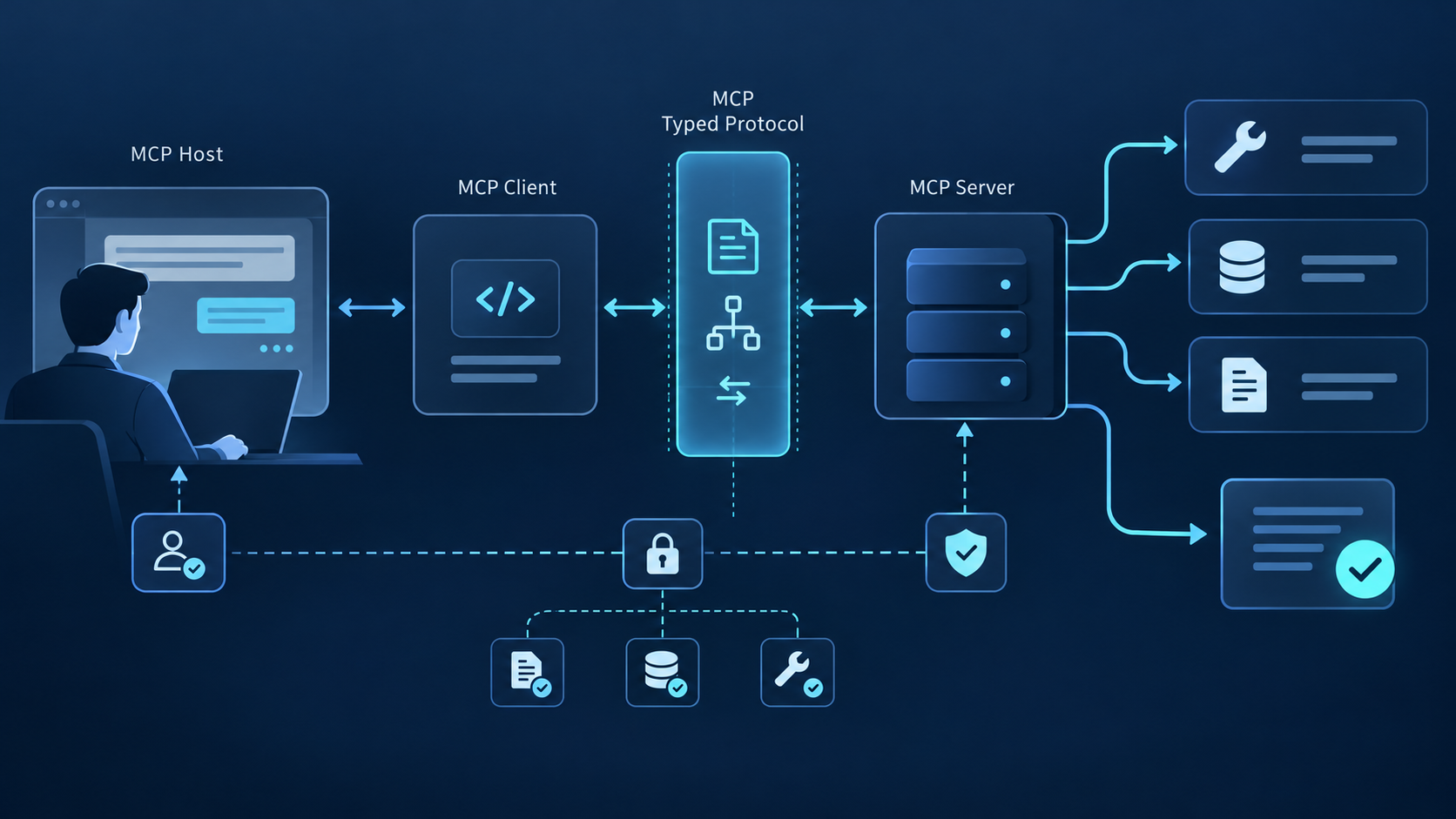
MCP Tools GuideMCP 工具 指南
- Problem: MCP tools let AI assistants take actions, but tools/list discovery injects full schemas into every prompt — 50 tools consume 10,000-25,000 tokens in overhead alone.
- Solution: Anthropic Tool Search (lazy-loading), OpenAI allowed_tools (whitelist), and CLI subprocess patterns address different dimensions of the token overhead problem.
- Result: Understanding how MCP tools work at the protocol level helps you design more efficient tool sets and choose the right optimization strategy for your production workload.
What Are MCP Tools?
MCP tools are the model-controlled primitive in the Model Context Protocol that lets AI assistants take actions like querying APIs or executing code. The MCP specification defines tools as one of three primitives (alongside resources and prompts), with a name, description, and input schema invokable via tools/call.
Anthropic introduced the Model Context Protocol in November 2024, positioning tools as the mechanism that transforms an AI assistant from a passive responder into an active agent. The MCP specification defines a tool as a function with four components:
- name: A unique identifier the LLM uses to select the tool in a tools/call request
- description: Natural language explanation of what the tool does and when to use it — the primary signal the LLM uses for tool selection
- inputSchema: A JSON Schema describing the parameters the tool accepts
- annotations: (optional) Metadata including whether the tool is idempotent, whether it requires approval, or its danger level
The core execution RPC is tools/call. The client must use an exact tool name returned by tools/list, validate arguments against inputSchema, apply authorization and approval policy, send the request, then distinguish tool-reported errors from protocol or transport failures.
Unlike resources (which let the model read data) or prompts (which provide task templates), tools are model-controlled — the LLM decides which tool to invoke based on its understanding of the user's request and the tool descriptions. This is what makes MCP tools the action primitive of the protocol.
MCP tools are now supported by a broad ecosystem, but popularity is not a trust signal. Evaluate the server publisher, package or endpoint, requested credentials, tool schemas, side effects, data handling, update policy, and incident history before enabling tools.
MCP Tools vs Resources vs Prompts
MCP servers can expose tools, resources, and prompts. Use the primitive that matches control and intent: tools perform operations, resources expose addressable context, and prompts provide reusable interaction templates.
| Primitive | Control | Purpose | Example |
|---|---|---|---|
| Tools | Model-controlled | Perform actions, computations, API calls | Search web, send email, run SQL |
| Resources | Server-controlled | Read data managed by the server | File contents, database records, configs |
| Prompts | Server-controlled | Reusable prompt templates | Code review template, report generator |
Tools are the model-controlled primitive: the LLM decides when and how to invoke them. Each tool invocation goes through a tools/call request, and the result feeds back into the model's context for the next reasoning step.
Resources are server-managed data that the LLM
can read but not modify. Resources have a URI scheme (like
file:// or db://) and are exposed
through a resources/list and resources/read interface. The model
doesn't control when resources are read — it requests them through
a separate resources/read call.
Prompts are reusable prompt templates that servers can expose for specific workflows. A server might expose a "security code review" prompt that guides the model through a security checklist, or a "customer support response" template for handling support tickets. Prompts are server-controlled, not model-controlled.
The key distinction: tools let the model act, resources let the model read, and prompts guide how the model thinks. In practice, many MCP servers primarily expose tools — the MCP specification notes that tools are the most frequently implemented primitive in the ecosystem.
When to use each: Model a capability as a tool when the LLM needs dynamic, context-aware control over when to invoke it — like searching the web or executing code. Use resources when you want the server to control what data is available and when the model can access it — like reading from a database or file system. Use prompts when you want to enforce a specific workflow or reasoning pattern — like a security audit checklist or a customer response template. A single MCP server can expose all three primitives, but most production servers focus primarily on tools because they enable the most flexible, model-driven behavior.
Model an operation as a tool when it has typed arguments, explicit authorization, bounded side effects, and a result the client can validate. Do not turn every endpoint into a tool; a smaller, coherent surface is easier for models and humans to reason about.
How tools/list and tools/call Work
Discovery begins after initialization and capability negotiation. A client sends tools/list, follows pagination when present, caches the returned definitions, and refreshes the catalog when the server signals that the list changed.
tools/list responses to
include a cache lifetime, so a client does not need to inject or
retrieve the full catalog on every independently routed
request. Tool input schemas now use full JSON Schema 2020-12.
Cache keys must include server identity, protocol version,
authorization scope, and extension set; permission or schema
changes must invalidate the cached list.
tools/list
响应声明缓存周期,因此客户端不必在每个独立路由请求中重新获取或注入完整目录。
工具输入 Schema 现使用完整 JSON Schema 2020-12。
缓存键应包含服务器身份、协议版本、授权范围和扩展集合;权限或 Schema
变化时必须让缓存失效。
Phase 1: tools/list Discovery
When an MCP client connects to a server, it sends a
tools/list JSON-RPC request. The server responds with
the complete list of available tools, including each tool's name,
description, and inputSchema.
// tools/list JSON-RPC request (client → server)
{"jsonrpc": "2.0", "id": 1, "method": "tools/list", "params": {}}
// tools/list response (server → client)
{"jsonrpc": "2.0", "id": 1, "result": {
"tools": [
{
"name": "web_search",
"description": "Search the web for current information. Use when you need up-to-date facts or prices.",
"inputSchema": {
"type": "object",
"properties": {
"query": {"type": "string", "description": "The search query"}
},
"required": ["query"]
}
}
]
}}
Phase 2: LLM Tool Selection
The host decides how tool definitions reach the model. A simple host may include every schema; a production host can filter by policy, task, server, user scope, or context budget and load only relevant definitions.
Phase 3: tools/call Execution
When the LLM selects a tool, it generates a
tools/call request specifying the tool name and
arguments. The client routes this to the appropriate server, which
executes the tool and returns the result.
// tools/call JSON-RPC request (client → server)
{"jsonrpc": "2.0", "id": 2, "method": "tools/call", "params": {
"name": "web_search",
"arguments": {"query": "MCP protocol token overhead 2026"}
}}
// tools/call response (server → client)
{"jsonrpc": "2.0", "id": 2, "result": {
"content": [
{"type": "text", "text": "Tool call completed with a validated result."}
]
}}
Tool definitions have a measurable context cost, but there is no universal token cost per tool. Measure serialized names, descriptions, inputSchema, optional outputSchema, provider wrappers, and prompt-cache behavior with your exact model and client.
With multiple servers, the host decides whether to connect and list
every server eagerly or discover servers dynamically. It can cache
each server's tools/list response, group tools by
source, filter by user policy, and connect only the servers needed
for the current task. Measure the final definitions sent to the
model rather than assuming every configured tool enters context.
Inspect MCP Tool Schemas Before Calling
Loading every definition is reasonable for a small catalog. As schemas consume a meaningful share of the model context, the official client guidance recommends switching to progressive discovery rather than relying on a fixed tool-count threshold.
Do not plan capacity from a universal “tokens per tool” number. Serialize the exact definitions your host sends, tokenize them with the deployed model, and test selection quality at realistic catalog sizes. The official MCP client best-practices guide recommends context-percentage thresholds and progressive discovery when definitions become material.
Schema footprint depends on serialized names, descriptions, nested properties, enums, examples, annotations, output schemas, provider wrappers, and tokenizer behavior. The official MCP client guidance recommends measuring the deployed context share and switching to progressive discovery when definitions become material.
A large candidate set also makes selection harder. Reduce ambiguity with distinct names, task-specific descriptions, policy filtering, server grouping, and a search stage that returns a short candidate list before full schemas are loaded.
Use three complementary controls: progressive discovery limits when definitions enter context, policy filtering limits which tools are eligible, and programmatic execution can keep large intermediate results inside a sandbox instead of sending them through the model.
Scale MCP Tools with Progressive Discovery
The useful production pattern is Catalog → Inspect → Execute. Search a lightweight catalog, load the full schema only for selected candidates, then route approved calls through a broker that owns credentials, policy, timeouts, and audit logs.
| Problem It Solves | Approach | How It Works |
|---|---|---|
| Schema injected in every prompt | Anthropic Tool Search (lazy-loading) | Loads tool schemas on-demand when the LLM actually calls a tool, not upfront |
| 50+ tools causing decision degradation | OpenAI allowed_tools parameter | Restricts the active tool set per request, model only sees selected subset |
| Cross-server tool maintenance cost | CLI subprocess pattern (e.g., QVeris CLI) | Executes tool calls outside the MCP schema injection loop — zero prompt token overhead |
Catalog: Progressive Tool Discovery
The official progressive-discovery pattern keeps a lightweight catalog available to the model, searches for candidates by task, and loads complete definitions only after a candidate has been selected for inspection.
Progressive discovery avoids injecting every definition upfront. The official guidance suggests switching when definitions consume a configured share of context—for example 1%–5%—and loading full schemas only after the model selects a candidate.
Discovery adds a catalog or search step and can affect prompt caching when tool arrays change. Cache definitions host-side, refresh on list_changed, keep ordering stable, and measure latency and cache misses across full conversations.
Inspect: Load Only Relevant Tool Schemas
The
OpenAI API
supports an allowed_tools parameter that restricts
which tools the model considers for a given request. Instead of
exposing all tools in every request, you whitelist the specific
tools relevant to the current task.
For a customer support agent, you might whitelist
["lookup_order", "issue_refund", "escalate_ticket"] —
omitting the 90 other tools in the server that are irrelevant to
support tasks. This reduces both token overhead and decision
degradation.
The trade-off: allowed_tools requires task
classification to determine which tools to whitelist. If the
user's request is ambiguous, you may whitelist the wrong set. It's
most effective when task types are predictable and can be mapped
to tool subsets.
Execute: Route Approved Calls Through QVeris
QVeris can act as a capability discovery and routing layer outside the raw list-everything pattern. The application searches by task, inspects a candidate schema and provider notes, then invokes only an approved capability.
Use the QVeris flow as Discover → Inspect → Call. Discovery returns candidates; inspection confirms identifiers, arguments, units, provenance, authentication, and limits; the call stage receives only validated arguments and policy-approved credentials.
# QVeris CLI discover — shows available capabilities without schema injection
# This command runs outside the MCP protocol loop, consuming zero prompt tokens
$ qveris discover --category search --limit 5
# Returns:
# web_search Search the web for current information
# news_search Search news articles and press releases
# academic_search Search academic papers and preprints
# image_search Search for images by description
# video_search Search video platforms for content
# Tool invocation via subprocess (zero context overhead)
$ qveris call web_search --query "MCP token overhead benchmark"
This pattern is most useful when agents need capabilities across many providers and the catalog cannot fit comfortably in context. Keep direct MCP servers for workloads that require isolated credentials, on-premises execution, or deterministic provider selection.
A routing layer does not remove security responsibility. The host must still enforce allowlists, validate schemas and outputs, protect credentials, limit cost and runtime, preserve provenance, and record partial side effects.
Get started with the QVeris CLI with the setup guide: read the installation guide.
The trade-off is an additional dependency and policy boundary. Evaluate supported capabilities, provider provenance, data processing, quotas, latency, error behavior, observability, and an exit path before production adoption.
MCP Tools Security and Validation Checklist
Good MCP tools are narrow enough to validate, descriptive enough to select correctly, and explicit enough for users to understand risk. Treat tool design as an API, security, and model-interface problem at the same time.
Write descriptive tool names and descriptions
Write descriptions that state the operation, when to use it, important limits, and side effects. Avoid instructions that attempt to override the host or user. Descriptions guide selection; server-side authorization remains mandatory.
Keep inputSchema minimal
Only define parameters the LLM actually needs to provide. If a
parameter has a reasonable default or can be inferred, omit it
from the required schema. Every extra field in inputSchema adds
tokens to the schema injection overhead. Use
enum for parameters with fixed options — this
reduces ambiguity without adding verbose descriptions.
Design error responses the LLM can act on
Return tool-originated failures with isError: true and an actionable, sanitized message so the model can correct arguments. Use protocol errors for unsupported methods or invalid protocol conditions, and never expose secrets or internal stack traces.
Group related tools under descriptive names
If you have 10 similar search tools (web_search, news_search,
academic_search, image_search), consider whether they could be a
single tool with a type parameter. Every additional
tool in the list adds to schema overhead and decision
complexity. Consolidate when tools differ only in a parameter
value, not in their fundamental purpose.
Before production, record the exact serialized schema footprint, known-answer tests, invalid-input behavior, permission denial, timeout and retry policy, output validation, list_changed handling, logs, metrics, and rollback procedure.
Discover and Inspect Capabilities Before Calling
Use QVeris to discover candidate capabilities and inspect their schemas and provider notes before your application authorizes a call.
Explore QVeris CLI →