
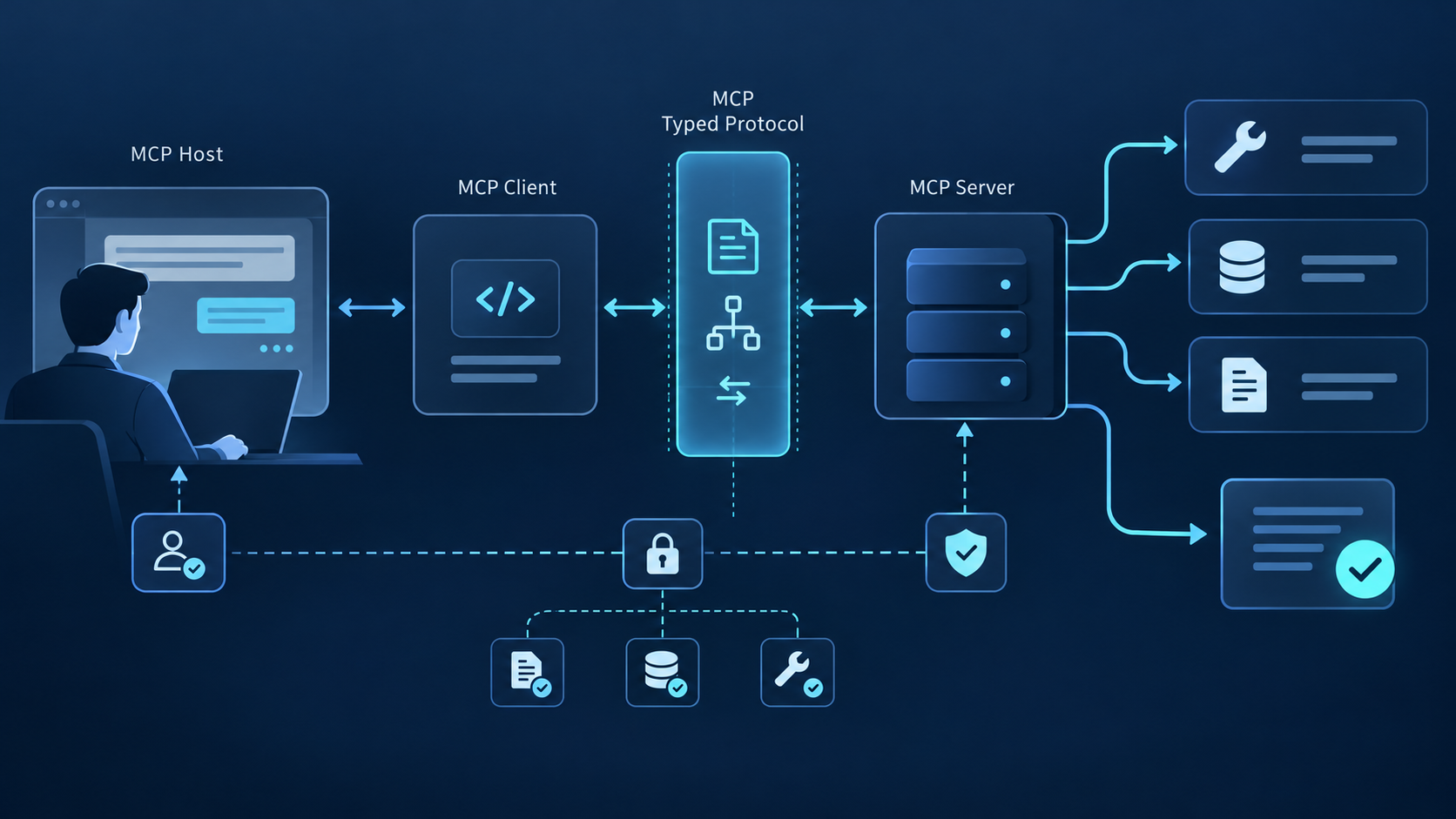
- Problem: AI agents need tools and data, but every server introduces a trust boundary, capability set, credential path, failure mode, and operational dependency.
- Solution: Evaluate servers by provenance, protocol and transport support, schemas, authorization, side effects, data handling, observability, failure behavior, and exit strategy—not by popularity alone.
- Result: A repeatable workflow for discovering, inspecting, authorizing, calling, validating, monitoring, and replacing MCP servers in production AI applications.
What Is an MCP Server?
An MCP server is a capability provider in the Model Context Protocol that exposes capabilities to an MCP client. A server can publish tools, resources, and prompts through JSON-RPC, while the transport layer carries those messages over stdio or Streamable HTTP. The host—not the server—decides how capabilities enter the model context and when user approval is required.
An MCP server is the capability provider in the Model Context Protocol. While MCP clients (inside AI applications like Claude Desktop or Cursor) initiate connections, servers respond to those connections by exposing the tools, resources, and prompts available to connected clients.
MCP has a required base protocol and lifecycle, while individual features are negotiated during initialization. A server may support tools/list and tools/call, resources/list and resources/read, or prompts/list and prompts/get. Do not assume every server exposes all three primitives.
The ecosystem includes official SDKs, reference implementations, vendor-hosted remote servers, local community packages, and public registries. A listing or repository star count is discovery evidence—not a security certification. Start with the official MCP server concepts and architecture overview, then verify the exact server artifact you plan to execute.
1. Provenance: namespace ownership, publisher, package or endpoint origin, release history, and update channel
2. Protocol contract: negotiated version, declared capabilities, schema stability, pagination, and errors
3. Security boundary: identity, scopes, credential storage, side effects, output handling, and approvals
4. Operations: timeouts, rate limits, retries, logs, tracing, health checks, version pinning, and rollback
5. Fitness: the smallest capability set and transport that safely satisfies the intended workflow
Evidence source: current official specification, server or SDK documentation, package metadata, and tests from your deployment.
Production safety is shared across participants. Servers must validate inputs, enforce access control, rate-limit calls, and sanitize outputs; clients should show sensitive inputs, request confirmation, apply timeouts, validate results, and retain audit evidence. See the official MCP tools security requirements and authorization specification.
MCP Server vs MCP Client: The Architecture
The MCP architecture separates concerns clearly: servers provide capabilities, clients consume them, and hosts run one or more clients. This stateless design is intentional — servers don't track which clients connect to them, enabling composability across any MCP-compatible application.
Key architectural property: Clients don't know which other clients are connected to the same server, and servers don't track which clients are using them. A client sends a tools/list request and receives a list of available tools. The server simply responds to requests — it doesn't maintain session state or client identity. This means Claude Desktop, Cursor, Cline, and any other MCP-compatible client can all connect to the same MCP server without the server needing special configuration.
For developers building AI systems, the practical implication: your choice of MCP server is independent of your choice of MCP client. All MCP-compatible applications can connect to the same servers, because the MCP specification standardizes the communication interface.
MCP Server Selection Matrix
Use this matrix to choose a server pattern by trust boundary and workload. Confirm every field against the exact release you deploy; names, schemas, transports, and permissions can change independently.
| Server Pattern | Capability Scope | Provenance Check | Schema Check | Transport | Primary Risk | Authorization | Validation |
|---|---|---|---|---|---|---|---|
| Repository server | Code, issues, pull requests | Publisher and package | Read vs write tools | stdio / Streamable HTTP | Write side effects | Repository-scoped token | Test branch and rollback |
| Design server | Files, nodes, tokens | Vendor documentation | File and node identifiers | Local or remote | Large context | File-scoped access | Known component fixture |
| Work management server | Issues, projects, comments | Workspace owner | Status and team enums | stdio / Streamable HTTP | Unintended updates | Workspace scopes | Sandbox project |
| Observability server | Errors, traces, projects | Vendor endpoint | Time range and project | Streamable HTTP | Sensitive telemetry | Organization scopes | Known incident fixture |
| Documentation server | Reference content | Source and freshness | Version and library ID | stdio / remote | Stale context | Public or account key | Version-specific question |
| Search server | Web or vertical search | Provider and index | Locale, time, result fields | stdio / remote | Untrusted content | Provider key | Source and date checks |
| Database server | Schema, queries, mutations | Package maintainer | SQL and result limits | stdio / remote | Data mutation | Read-only database role | Transaction and row limit |
| Knowledge server | Pages, blocks, search | Workspace integration | Page and block model | Streamable HTTP | Oversharing | Page-scoped integration | Dedicated test page |
Validation rule: Measure initialization, discovery, authorization, execution, retries, and result validation separately. Never reuse a latency number from another region, provider, payload, account tier, or concurrency level.
Eight MCP Server Examples and What to Verify
These examples illustrate different capability and trust patterns. Treat every count, schema, transport, and permission as release-specific. Labels marked Verified indicate where the publisher offers an official implementation or documentation—not a blanket security approval.
1. GitHub MCP Verified
GitHub MCP exposes 12 tools for interacting with GitHub repositories, including issues, pull requests, code search, and file operations. Confirm the current implementation and release at github.com/github/github-mcp-server. Inspect tools/list, separate read from write operations, test against a non-production repository, and grant only the repository permissions required by the selected workflow.
Best for: Teams building AI coding assistants that interact with code repositories, automate issue triage, or generate PR descriptions.
Config note: Requires
GITHUB_TOKEN env variable with at least
repo scope. Missing scopes result in an empty tools/list — a common debugging pitfall.
2. Figma MCP
Figma MCP exposes capabilities for interacting with Figma design files — retrieving components, accessing design tokens, reading comments, and navigating file structures. Requires a Figma account with file access permissions. Verify the current feature set from Figma's MCP documentation (help.figma.com).
Best for: Design-to-code pipelines where AI needs to understand visual designs and convert them into implementation.
3. Linear MCP
Linear MCP exposes capabilities for managing Linear workspaces — creating and updating issues, managing projects and cycles, and interacting with comments. Linear's API-first architecture makes it useful for workflow automation. Verify schemas, scopes, and side effects from Linear's MCP integration documentation.
Best for: Engineering teams building AI assistants that handle sprint planning, issue triage, or status updates.
4. Sentry MCP Verified
Sentry MCP exposes capabilities for interacting with Sentry's error tracking — looking up errors by fingerprint, creating issues, and retrieving stack traces. Inspect the current tool schemas, test with a known incident, minimize organization permissions, and prevent sensitive telemetry from entering prompts or logs.
Best for: AI systems that write code and need to self-correct based on runtime errors.
Config note: Missing or insufficient-scope auth tokens cause tools/list to return empty arrays rather than errors — verify your SENTRY_AUTH_TOKEN has at least
org:read scope.
5. Context7
Context7 MCP exposes capabilities for retrieving contextual documentation from project repositories. Built by Upstash (github.com/upstash/context7), it indexes code, README files, and API documentation, then provides semantic search and context retrieval tools. No authentication required for public repositories.
Best for: AI coding assistants that need to understand a codebase before generating suggestions.
6. Brave Search MCP Verified
Brave Search MCP exposes web and local search capabilities. Inspect the current schema and provider terms, treat returned web content as untrusted, preserve source URLs and dates, and measure performance in your own environment. Check the current modelcontextprotocol/servers repository.
Best for: AI systems needing real-time web information while avoiding Google/Bing API costs.
Config note: Free Brave Search API key from
api.search.brave.com. Set as BRAVE_API_KEY env variable.
7. Supabase MCP
Supabase MCP exposes capabilities for interacting with Supabase projects — running SQL queries, inspecting schemas, and managing auth. Community-maintained at github.com/supabase-community/supabase-mcp. Requires a Supabase project URL and service role key.
Best for: AI systems that need to generate SQL from natural language, query databases, or automate data workflows.
8. Notion MCP
Notion MCP exposes capabilities for interacting with Notion workspaces — reading and writing pages, searching content, and managing comments. Requires a Notion integration token. Tool behavior should be verified from the current integration documentation at notion.so/my-integrations.
Best for: Teams using Notion as their primary knowledge management system. AI can read, update, and surface documentation.
MCP Server Examples: How They Work in Practice
Understanding how an MCP server works under the hood helps you evaluate servers, debug connection issues, and build custom servers. Below is a minimal FastMCP server implementation and the JSON-RPC flow that powers tool discovery.
Building a Minimal MCP Server with the Python SDK
# Minimal MCP server with FastMCP
# Source: official MCP Python SDK documentation
# Pin and test the current SDK release before deployment

from mcp.server.fastmcp import FastMCP

mcp = FastMCP("my-server")

@mcp.tool()
def search_docs(query: str) -> str:
    """Search documentation for a query string."""
    return f"Results for: {query}"

@mcp.tool()
def get_doc_content(doc_id: str) -> str:
    """Retrieve the full content of a document by ID."""
    # Implementation would fetch from your doc store
    return f"Content of {doc_id}"

# Run: python my_server.py
# Or: fastmcp dev my_server.py (hot reload for development)
# Connect: Configure in claude_desktop_config.json as stdio
The FastMCP decorator-based approach keeps server code minimal. Each decorated function automatically becomes a tool with its name from the function name, description from the docstring, and input schema from type annotations.
JSON-RPC Request/Response Flow
Tool discovery and invocation use JSON-RPC 2.0 over stdio or Streamable HTTP:
// Step 1: Client discovers available tools
// Client → Server (via stdio stdin or HTTP POST)
{"jsonrpc": "2.0", "id": 1, "method": "tools/list", "params": {}}

// Step 2: Server returns tool definitions
// Server → Client (via stdio stdout or HTTP response)
{"jsonrpc": "2.0", "id": 1, "result": {
  "tools": [
    {"name": "search_docs", "description": "Search documentation for queries", "inputSchema": {"type": "object", "properties": {"query": {"type": "string"}}}}
  ]
}}

// Step 3: Client invokes a tool
{"jsonrpc": "2.0", "id": 2, "method": "tools/call", "params": {
  "name": "search_docs", "arguments": {"query": "authentication best practices"}
}}

// Step 4: Server returns results
{"jsonrpc": "2.0", "id": 2, "result": {
  "content": [{"type": "text", "text": "Results for: authentication best practices"}]
}}
Every request includes a jsonrpc version, an
id for correlation, a method name, and
params. Responses include the same
id and a result or error. This simplicity makes MCP servers easy to implement and debug — no custom protocol parsing or state management required.
Production MCP Server Workflow and Trust Boundaries
A production flow should discover candidates, inspect provenance and schemas, authorize the narrowest action, call with validated arguments, and validate the result against its source. Keep the host, MCP server, authorization server, and downstream service boundaries explicit in logs and incident response.
Decision framework:
Search a trusted registry, vendor document, or approved catalog. Record the publisher, artifact, endpoint, version, transport, and requested credentials before installation.
Review capability declarations and exact schemas. Separate read from write actions, bind tokens to the intended resource, request minimal scopes, and require approval for sensitive calls.
Validate arguments server-side, apply deadlines and rate limits, preserve request identity, treat returned content as untrusted, and verify important outputs against the source.
Monitor initialization, errors, latency, cost, approvals, and downstream side effects. Pin versions, rehearse credential revocation, keep rollback instructions, and test replacement.
QVeris can serve as an optional capability discovery and routing layer in this workflow (QVeris CLI documentation). MCP still defines the protocol, the host controls context and approvals, each MCP server enforces authorization, and downstream providers remain responsible for their own data and operations.
Deployment Options for MCP Servers
MCP servers can be deployed in three patterns, each with different trade-offs for security, scalability, and operational overhead.
| Deployment | Transport | Security | Scalability | Best For |
|---|---|---|---|---|
| Local Process | stdio | Process isolation | Single user | Development, CLI tools |
| Remote Service | Streamable HTTP | Authentication required | Team scale | Production, team access |
| Managed Platform | HTTP / SDK | Built-in auth + monitoring | Enterprise | Enterprise, scaled deployments |
Local Process (stdio)
Simplest deployment: run the MCP server as a local process and connect via stdio. Works well for development, CLI tools, and single-user workflows. Claude Code and other CLI-based clients typically use stdio transport. Configuration is minimal — point your MCP client at the process command. The downside: the server is tied to the local machine, preventing team sharing and remote access.
Remote Service (Streamable HTTP)
For shared production workflows, deploy the MCP server as a remote HTTP service and verify its transport and authorization requirements. Follow MCP Security Best Practices to validate token audiences and limit permissions. Test endpoint availability, timeout handling, and failure recovery against the server and configuration you actually deploy.
Managed Platform
Managed MCP platforms like Apigene, Prefect, and AWS Bedrock handle authentication, monitoring, scaling, and security. CData MCP Server Best Practices for 2026 discusses production MCP governance, permissions, and operational best practices.
// Example: Claude Desktop config connecting a meta-server
// macOS: ~/Library/Application Support/Claude/claude_desktop_config.json
// Windows: %APPDATA%\Claude\claude_desktop_config.json

{
  "mcpServers": {
    "qveris": {
      "command": "npx",
      "args": ["-y", "@qverisai/mcp"],
      "env": {
        "QVERIS_API_KEY": "your-api-key"
      }
    }
  }
}

// Alternative: connecting a single-purpose server directly
// See each server's repository for its specific config format
After configuring, restart your MCP client. The server's tools become available through the standard MCP tool discovery flow.
FAQ: MCP Servers
Explore MCP Servers for Your AI Agent
Whether you choose single-purpose servers, a managed platform, or a meta-server, the MCP protocol makes integration consistent. Start with one server that matches your primary use case, evaluate its tool coverage, and scale from there.
Learn More →