QVeris
Run a task
QVeris · Production Agent GuideBest Practices

Tool Calling Best Practices

A practical engineering guide to building reliable AI agents with robust tool calling, including validation, error handling, fallback routing, MCP integration, and QVeris capability workflows.

Reliable · Safe · Observable · Scalable

Reliable
Tool Calling
Production
Safety
Schema
Validation
QVeris
Support
✓ Production Ready Patterns
TL;DR
Problem: Most AI agent tool calling systems work in demos but fail in production due to missing validation, poor error handling, weak schema enforcement, lack of retries, and no fallback routing.
Solution: Production-grade tool calling requires structured workflows: validate schemas before calling tools, implement retries with backoff, enforce output validation, design fallback strategies, log tool execution, and use capability routing systems like QVeris.
Result: You get a stable, observable, and scalable AI agent system where tool calling is safe, predictable, and recoverable even under failure conditions.

What Is Tool Calling in Production AI Agents?

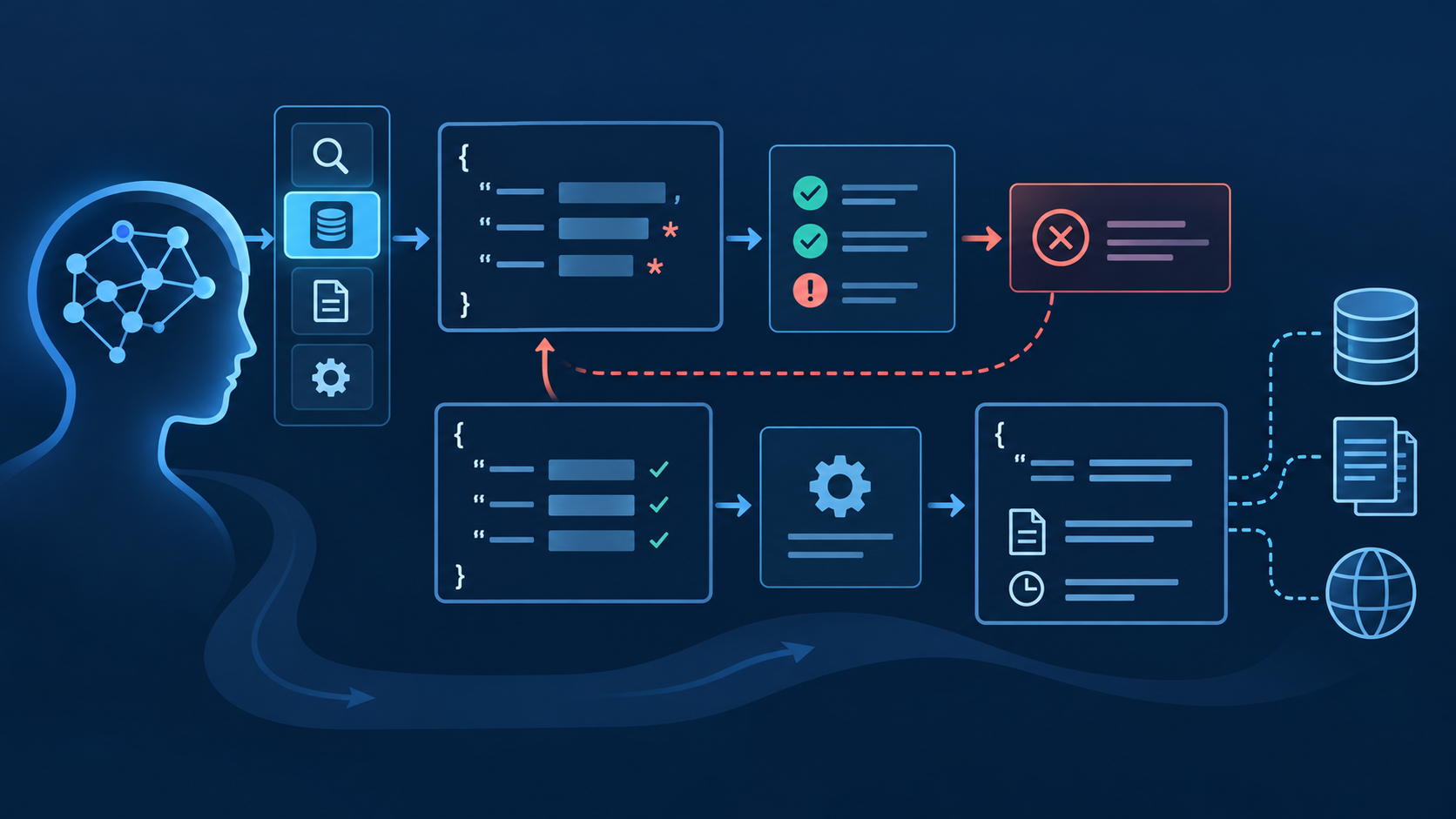
Production tool calling is not just invoking APIs. It is a controlled engineering system where AI agents select tools, validate schemas, execute calls, handle failures, verify outputs, log results, and route to fallback tools when needed — all within a predictable, observable, and recoverable architecture.

The gap between demo and production is real. In a demo, a tool call succeeds once with pre-configured inputs, a valid API key, and no rate limits. In production, tools fail for dozens of reasons: expired credentials, schema mismatches, network timeouts, rate limit 429s, empty responses, malformed JSON, stale provider metadata, or simply because the wrong tool was selected. Demo = tool works once. Production = tool must work reliably under failure, scale, latency, and missing data.

Why Tool Calling Fails in Production

📐

1. No Schema Validation

Agent calls a tool with symbol when it expects ticker. The call fails — and the agent doesn't know why. Schema validation before calling catches this silently.

2. Wrong Tool Selected

Three tools overlap. The agent picks one based on name similarity, not schema fit. The tool returns partial data. The agent proceeds with incomplete information.

🔐

3. Missing Authentication

The tool requires an API key that expired or was never provisioned. The agent discovers this at call time — with no fallback configured.

🔄

4. No Retry Strategy

A transient network error kills the call. Without retry logic, a one-second blip becomes a permanent failure in the agent's output.

🔗

5. No Fallback Tools

The primary tool returns 429 (rate limited). The agent has no second option. It returns "I couldn't complete the task" when a fallback tool was available but unconfigured.

🤫

6. Silent Failures

The tool returns HTTP 200 with an empty body or a partial JSON. The agent treats it as success. The downstream workflow receives garbage data with no error flag.

7. Rate Limits & Latency

Free-tier API limits are hit during a market event. Calls start returning 429s. The agent has no rate-limit-aware routing.

📋

8. Unstructured Outputs

The tool returns HTML instead of JSON, or plain text instead of structured fields. The agent's parsing logic breaks. No output validation catches the mismatch.

Core Principles of Reliable Tool Calling

PrincipleWhat It Means in Production
Validate Before CallCheck input schema, required fields, types, and auth before execution — never call blind
Assume FailureTools will fail sometimes. Design every call path with that assumption built in from the start
Always Have FallbackEvery critical tool category should have at least one ranked backup capability
Normalize OutputsConvert all tool responses to structured, validated formats before passing to downstream reasoning
Log EverythingRecord tool name, inputs, outputs, latency, status, retries, and fallback usage for every call
Separate Reasoning from ExecutionThe LLM decides what to do. The execution layer handles how — validation, retry, routing, logging
Route, Don't HardcodeUse capability routing instead of hardcoding "always call Tool X" — providers change, schemas evolve

Schema Validation Best Practices

Never call a tool without validating its input schema first. Schema validation is the single highest-ROI practice in production tool calling — it prevents the most common failure mode (parameter mismatch) before any API call is made.

✓ Validate Required Fields

Confirm every required parameter is present, correctly typed, and within allowed values before execution. A missing symbol or a string where an integer is expected will fail — catch it early.

✓ Validate Types and Enums

Ensure string fields are strings, numeric fields are numbers, boolean fields are booleans, and enum fields match allowed values. Type coercion at the API layer is not reliable across providers.

✓ Handle Optional Fields Gracefully

Optional fields should have explicit defaults or be omitted entirely. Do not pass null where the tool expects omission — provider behavior varies.

✓ Verify Auth Before Calling

Check that required API keys, OAuth tokens, or authentication headers are available and unexpired before attempting the call. Auth failures are the second most common production issue after schema mismatches.

schema_validation.json — Terminal
// Schema validation — before calling any tool { "validation_checks": [ "required_fields_present", "types_match_expected", "enum_values_valid", "auth_available_and_unexpired", "optional_fields_handled", "constraints_satisfied" ], "on_validation_failure": "do_not_call_tool__route_to_fallback" }

Tool Selection Strategies

Production agents should not pick tools only by name. Selection should consider task intent, schema match, latency, cost, reliability, output structure, and historical success rate.

StrategyWhen to UseProduction Notes
Rule-Based RoutingSimple, predictable systems with few toolsFragile when tools change; best for internal APIs
LLM-Based SelectionFlexible tasks with moderate tool countsAdds latency; requires prompt engineering for consistency
Embedding-Based MatchingLarge tool sets (50+) with diverse capabilitiesRequires tool description embeddings; good for initial filtering
QVeris Capability RoutingMulti-provider agent systems with fallback needsDiscovers, inspects, and ranks capabilities by task intent; includes schema validation and fallback routing

Error Handling & Retry Mechanisms

Every tool call path must include error handling. Common failures include timeouts, rate limits (429), invalid schemas (400), missing auth (401/403), empty responses, and malformed JSON. Each requires a different recovery strategy.

⏱ Exponential Backoff with Jitter

Retry with increasing delays: 1s → 2s → 4s → 8s (max 3 retries). Add random jitter to prevent thundering-herd retries. Never retry instantly — you will amplify the provider's load and worsen the outage.

🔌 Circuit Breaker Pattern

If a tool fails N consecutive times, stop calling it for a cooldown period. This prevents cascading failures and gives the provider time to recover. Re-enable gradually with a probe request.

🔄 Retry Flow

Tool A → fail → retry with backoff → fail → retry with backoff → fail → switch to Tool B (fallback) → success. The agent never returns "I couldn't complete the task" unless all fallbacks are exhausted.

Fallback Routing Strategies

Every critical tool category must have at least one ranked fallback. No single point of failure is acceptable in production.

Market Data Fallback Chain

Primary: real_time_stock_price → Fallback 1: cached_price_api → Fallback 2: historical_price_api → Fallback 3: secondary_provider. Each fallback may have higher latency or lower fidelity, but the agent continues to function.

Fallback Design Rules

1. Rank fallbacks by fidelity (closest to primary first). 2. Accept gracefully degraded outputs at lower tiers. 3. Log every fallback activation — it is a leading indicator of provider issues. 4. Test fallback paths regularly — untested fallbacks are not real fallbacks.

Production tool-calling loop

Security & Permission Control

🔐

API Key Isolation

Never share API keys across tools. Each tool or provider should have its own credential scope. Rotate keys regularly and never expose them in agent logs or LLM context windows.

🛡

Tool-Level Permissions

Not every agent should access every tool. Implement tool-level access control — read-only tools for research agents, write tools only for explicitly authorized workflows.

📦

Sandbox Execution

Execute tool calls in isolated environments. A tool that writes files, sends emails, or modifies data should never run with unrestricted system access.

Input Sanitization & Output Filtering

Sanitize inputs before calling external tools. Filter outputs before passing to LLM reasoning — remove sensitive data, truncate oversized responses, and flag unexpected content.

Observability & Logging

Every tool call must be logged. Without observability, production agents are black boxes — you will not know which tool failed, why, or whether the fallback was activated until a user reports the issue.

Minimum Logged Fields

tool_name, input_schema_hash, output_status, latency_ms, error_type, retry_count, fallback_used, timestamp, provider. These 9 fields give you enough data to debug any production issue without logging sensitive payload contents.

tool_call_log.json — Terminal
// Production tool call log entry — minimum viable schema { "tool": "stock_price_api", "latency_ms": 320, "status": "success", "retry_count": 0, "fallback_used": false, "error_type": null, "timestamp": "2026-06-23T14:32:00Z", "provider": "polygon_io" }

MCP Integration Best Practices

MCP standardizes tool exposure, but production systems still need validation, routing, retry logic, and observability on top of MCP connectivity.

LayerResponsibilityProduction Notes
MCPTool exposure and connectivityStandardizes how tools are described and connected
Tool CallingExecution and error handlingValidates inputs, executes calls, handles errors, retries
Tool RoutingSelection and fallbackChooses the best tool; switches on failure
Production SystemReliability, observability, securityLogs, monitors, secures, and scales tool execution

QVeris Support for Production Tool Calling

QVeris helps production agents implement the Discover → Inspect → Call → Validate → Route pattern — structured capability routing that replaces hardcoded single-tool dependencies with validated, fallback-aware execution.

🔍

Discover

Find relevant tools across MCP servers, external APIs, and capability catalogs based on task intent — not hardcoded tool names.

📐

Inspect & Validate

Check schema, auth, cost, latency, and provider notes before calling. Validate input parameters. Eliminate unsuitable candidates early.

Call & Retry

Execute selected tool with retry logic. On failure, route to ranked fallback. Log every attempt. Never return "I couldn't complete the task" while fallbacks remain.

Validate & Report

Check output structure, timestamps, source metadata, errors. Return structured result with full traceability — tool used, latency, retry count, fallback status.

production_tool_calling.json — Terminal
// Production tool calling workflow — structured capability routing { "workflow": "production_tool_calling", "steps": [ "discover_capabilities", "inspect_schema", "select_tool", "validate_inputs", "call_tool", "validate_output", "fallback_if_needed" ], "reliability_features": [ "schema_validation", "exponential_backoff_retry", "ranked_fallback_routing", "structured_logging", "rate_limit_handling", "output_normalization" ] }

QVeris is a capability routing layer. It helps production agents implement structured tool discovery, inspection, and routing — replacing hardcoded single-tool dependencies with validated, fallback-aware execution. QVeris MCP Server documentation or view pricing →.

Getting Started Checklist

Define tool schemas strictly — required fields, types, enums, constraints
Validate all inputs before calling tools — never call blind
Implement retry with exponential backoff and jitter
Add ranked fallback tools for every critical capability
Log all tool executions — tool, latency, status, retries, fallback
Monitor latency and failure rate per tool per provider
Normalize outputs to structured formats before passing to reasoning
Separate reasoning (LLM) and execution (routing/validation) layers
Add MCP compatibility layer if using MCP-exposed tools
Use QVeris capability routing for multi-provider tool selection and fallback

QVeris is a capability routing layer. Production agent reliability requires engineering across all layers — validation, routing, observability, and security.

Build Reliable Production AI Agents

QVeris gives your agents structured capability routing with built-in discovery, schema inspection, validation, and fallback — the production tool calling patterns that keep agents running when tools fail.

Test a Tool-Calling Workflow测试工具调用工作流Read the MCP Server Documentation阅读 MCP Server 文档

FAQ

Why does tool calling fail in production AI agents?
Most failures come from missing schema validation, poor error handling, lack of retry strategies, no fallback tools, and assuming demo-quality execution works at production scale. Real production environments have network latency, rate limits, expired credentials, provider schema changes, and partial responses — each of which breaks an agent that was only tested in ideal conditions.
Is function calling enough for production agents?
No. Function calling handles the execution format — how the model outputs structured arguments. Production systems also need schema validation, retry logic, fallback routing, error recovery, observability, security controls, and capability routing across multiple providers. Function calling is one layer; production reliability requires several more.
What is the most important production tool calling practice?
Schema validation before calling and fallback routing after failure. Together they prevent the two most common production failure modes: calling a tool with mismatched parameters, and having no recovery path when a tool is unavailable or rate-limited. Every other practice — retries, logging, observability — builds on these two foundations.
How does MCP affect production tool calling?
MCP standardizes how tools are exposed to models and agents, which simplifies connectivity. But it does not solve validation, routing, retry logic, fallback strategies, or observability — those remain production engineering concerns. MCP makes tools easier to connect; production engineering makes them reliable to call.
How many fallback tools should I have per capability?
At least one ranked fallback per critical tool category. The fallback may have higher latency, lower fidelity, or cost more — but the agent continues to function. For mission-critical capabilities (market data, filings, alerts), consider two fallbacks. Test every fallback path regularly — an untested fallback is not a real fallback.
How does QVeris help with production tool calling?
QVeris helps agents implement the Discover → Inspect → Call → Validate → Route pattern — structured capability routing that replaces hardcoded single-tool dependencies with validated, fallback-aware execution across MCP servers, external APIs, and capability catalogs.
QVeris · 生产级 Agent 指南最佳实践

工具调用最佳实践

构建可靠 AI Agent 的实用工程指南,涵盖验证、错误处理、回退路由、MCP 集成和 QVeris 能力工作流。

可靠 · 安全 · 可观察 · 可扩展

可靠
工具调用
生产级
安全
Schema
验证
QVeris
支持
✓ 生产就绪模式
摘要
问题:大多数 AI Agent 工具调用系统在演示中工作正常,但在生产环境中因缺少验证、错误处理薄弱、Schema 执行不严、缺乏重试和无回退路由而失败。
解决方案:生产级工具调用需要结构化工作流:调用工具前验证 Schema,实现带退避的重试,强制执行输出验证,设计回退策略,记录工具执行日志,并使用像 QVeris 这样的能力路由系统。
结果:您将获得一个稳定、可观察、可扩展的 AI Agent 系统,其中工具调用即使在故障条件下也是安全、可预测和可恢复的。

什么是生产级工具调用?

生产级工具调用不仅仅是调用 API。它是一个受控的工程系统,AI Agent 在其中选择工具、验证 Schema、执行调用、处理故障、验证输出、记录结果,并在需要时路由到回退工具 — 所有这些都在可预测、可观察和可恢复的架构中进行。

演示和生产之间的差距是真实存在的。在演示中,工具调用使用预配置的输入、有效的 API 密钥且无速率限制,一次成功。在生产环境中,工具可能因数十种原因失败:凭证过期、Schema 不匹配、网络超时、速率限制 429、空响应、格式错误的 JSON、过时的提供商元数据,或仅仅因为选择了错误的工具。演示 = 工具工作一次。生产 = 工具必须在故障、规模、延迟和缺失数据条件下可靠工作。

为什么工具调用在生产中失败

📐

1. 缺少 Schema 校验

工具需要 ticker 参数,Agent 却传入 symbol。调用随即失败,而且 Agent 无法判断原因。调用前执行 Schema 校验即可提前拦截这类问题。

2. 选错工具

三个工具的能力相互重叠,Agent 却按名称相似度而不是 Schema 匹配度选择工具。工具只返回部分数据,Agent 随后基于不完整信息继续推理。

🔐

3. 缺少认证

工具需要的 API Key 已过期或从未配置,Agent 到调用时才发现问题,而且没有可用的回退方案。

🔄

4. 没有重试策略

短暂网络错误导致调用中断;没有重试逻辑时,一秒钟的波动会变成 Agent 输出中的永久失败。

🔗

5. 没有备用工具

主工具返回 429 速率限制,Agent 却没有第二选择;明明存在备用工具,只因未配置就只能回复“无法完成任务”。

🤫

6. 静默失败

工具返回 HTTP 200,但正文为空或 JSON 不完整;Agent 仍把它视为成功,导致下游工作流接收到没有错误标记的无效数据。

7. 速率限制与延迟

市场事件期间免费 API 额度被耗尽,调用开始返回 429,而 Agent 没有感知速率限制的路由策略。

📋

8. 非结构化输出

工具返回 HTML 而不是 JSON,或返回纯文本而不是结构化字段,解析逻辑随之失效;由于缺少输出验证,这种格式不匹配未被发现。

可靠工具调用的核心原则

原则生产环境中的含义
调用前验证执行前检查输入 Schema、必填字段、类型和认证,绝不盲目调用。
默认故障会发生工具偶尔必然会失败,因此每条调用路径都应从一开始就按这一前提设计。
始终准备回退方案每一类关键工具都应至少配置一个经过排序的备用能力。
规范化输出所有工具响应都应先转换为经过验证的结构化格式,再交给下游推理。
记录完整调用轨迹为每次调用记录工具名称、输入、输出、延迟、状态、重试次数和回退使用情况。
分离推理与执行LLM 负责决定做什么,执行层负责如何完成,包括验证、重试、路由和日志。
使用路由,不要硬编码使用能力路由,不要硬编码“始终调用工具 X”;提供商会变化,Schema 也会演进。

Schema 验证最佳实践

永远不要在没有先验证其输入 Schema 的情况下调用工具。Schema 验证是生产工具调用中 ROI 最高的实践 — 它在任何 API 调用之前就防止了最常见的失败模式(参数不匹配)。

✓ 验证必填字段

执行前确认每个必填参数均已提供、类型正确且处于允许范围内。缺少 symbol,或在整数位置传入字符串,都会导致失败,应尽早拦截。

✓ 验证 类型和枚举

确保字符串、数字和布尔字段类型正确,枚举值符合允许范围;不同提供商的 API 层并不都能可靠完成类型转换。

✓ 妥善处理可选字段

可选字段应设置明确默认值,或完全省略。工具要求省略字段时不要传入 null,不同提供商对此的处理并不一致。

✓ 调用前验证认证

尝试调用前检查所需 API Key、OAuth Token 或认证请求头是否存在且未过期。除 Schema 不匹配外,认证失败是最常见的生产问题之一。

schema_validation.json — Terminal
// Schema validation — before calling any tool { "validation_checks": [ "required_fields_present", "types_match_expected", "enum_values_valid", "auth_available_and_unexpired", "optional_fields_handled", "constraints_satisfied" ], "on_validation_failure": "do_not_call_tool__route_to_fallback" }

工具选择策略

生产 Agent 不应仅凭名称选择工具。选择应考虑任务意图、Schema 匹配、延迟、成本、可靠性、输出结构和历史成功率。

策略适用场景生产注意事项
规则路由工具数量较少、行为可预测的简单系统工具变化时较脆弱,更适合内部 API
基于 LLM 的选择工具数量适中、任务较灵活的场景会增加延迟,并需要通过 Prompt 工程保持一致性
基于向量的匹配包含 50 个以上工具、能力类型多样的大型工具集需要工具描述向量,适合初步筛选
QVeris 能力路由需要回退能力的多提供商 Agent 系统按任务意图发现、检查并排序能力,同时支持 Schema 验证与回退路由

错误处理与重试机制

每个工具调用路径都必须包含错误处理。常见故障包括超时、速率限制(429)、无效 Schema(400)、缺少认证(401/403)、空响应和格式错误的 JSON。每种故障需要不同的恢复策略。

⏱ 带随机抖动的指数退避

按 1 秒、2 秒、4 秒、8 秒递增延迟重试(最多 3 次),并加入随机抖动避免大量请求同时重试。不要立即重试,否则会放大提供商负载并加重故障。

🔌 熔断器模式

工具连续失败 N 次后,在冷却期内暂停调用,避免级联故障并给提供商恢复时间;之后通过探测请求逐步恢复。

🔄 重试流程

工具 A → 失败 → 退避重试 → 失败 → 再次退避重试 → 失败 → 切换到工具 B(回退)→ 成功。只有所有回退方案均已耗尽,Agent 才应返回“无法完成任务”。

回退路由策略

每个关键工具类别必须至少有一个排序的回退方案。生产环境中不允许单点故障。

市场数据备用链路

主工具: real_time_stock_price回退 1: cached_price_api回退 2: historical_price_api回退 3: secondary_provider。回退方案可能延迟更高或精度略低,但能保证 Agent 持续运行。

备用方案设计规则

1. 按保真度为回退工具排序,最接近主工具的优先;2. 允许较低层级返回可接受的降级结果;3. 记录每次回退激活,因为它是提供商问题的领先信号;4. 定期测试回退路径,未经测试的回退并不可靠。

生产级工具调用循环

安全与权限控制

🔐

API Key 隔离

不要在工具之间共享 API Key。每个工具或提供商都应有独立凭据范围,定期轮换密钥,并避免在 Agent 日志或 LLM 上下文中暴露。

🛡

工具级权限

并非所有 Agent 都应访问全部工具。应实施工具级权限控制:研究 Agent 只使用只读工具,写入工具仅开放给明确授权的工作流。

📦

沙箱执行

在隔离环境中执行工具调用。能够写文件、发邮件或修改数据的工具不应拥有不受限制的系统访问权限。

输入清洗与输出过滤

调用外部工具前清理输入;把输出交给 LLM 推理前进行过滤,包括移除敏感数据、截断过大响应并标记异常内容。

可观察性与日志记录

每次工具调用都必须记录。没有可观察性,生产 Agent 就是黑盒 — 直到用户报告问题,你才知道哪个工具失败了、为什么失败、回退是否被激活。

最小日志字段

tool_nameinput_schema_hashoutput_statuslatency_mserror_typeretry_countfallback_usedtimestampprovider这 9 个字段足以排查生产问题,同时无需记录敏感载荷内容。

tool_call_log.json — Terminal
// Production tool call log entry — minimum viable schema { "tool": "stock_price_api", "latency_ms": 320, "status": "success", "retry_count": 0, "fallback_used": false, "error_type": null, "timestamp": "2026-06-23T14:32:00Z", "provider": "polygon_io" }

MCP 集成最佳实践

MCP 标准化了工具暴露,但生产系统仍然需要在 MCP 连接之上进行验证、路由、重试逻辑和可观察性。

层级职责生产注意事项
MCP工具暴露与连接标准化工具描述与连接方式
工具调用执行与错误处理验证输入、执行调用、处理错误与重试
工具路由选择与回退选择最合适的工具,并在失败时切换
生产系统可靠性、可观察性与安全记录、监控、保护并扩展工具执行

QVeris 对生产工具调用的支持

QVeris 帮助生产 Agent 实现 发现 → 检查 → 调用 → 验证 → 路由 模式 — 结构化能力路由,用经过验证、支持回退的执行取代硬编码的单工具依赖。

🔍

发现

根据任务意图在 MCP 服务器、外部 API 和能力目录中查找相关工具,而不是依赖硬编码工具名称。

📐

检查 & 验证

调用前检查 Schema、认证、成本、延迟和提供商说明,验证输入参数并尽早排除不合适的候选项。

调用并重试

使用重试逻辑执行选定工具;失败时路由到已排序的回退工具,并记录每次尝试。只要仍有回退方案,就不应直接回复“无法完成任务”。

验证并生成报告

检查输出结构、时间戳、来源元数据与错误,并返回具有完整追踪信息的结构化结果,包括所用工具、延迟、重试次数和回退状态。

production_tool_calling.json — Terminal
// Production tool calling workflow — structured capability routing { "workflow": "production_tool_calling", "steps": [ "discover_capabilities", "inspect_schema", "select_tool", "validate_inputs", "call_tool", "validate_output", "fallback_if_needed" ], "reliability_features": [ "schema_validation", "exponential_backoff_retry", "ranked_fallback_routing", "structured_logging", "rate_limit_handling", "output_normalization" ] }

QVeris 是能力路由层。它帮助生产 Agent 实现结构化工具发现、检查和路由 — 用经过验证、支持回退的执行取代硬编码的单工具依赖。QVeris MCP Server 文档查看定价 →

快速上手指南

严格定义工具 Schema — 必填字段、类型、枚举、约束
调用工具前验证所有输入 — 永远不要盲目调用
实现带指数退避和抖动的重试
为每个关键能力添加排序回退工具
记录所有工具执行 — 工具名称、延迟、状态、重试次数、回退
监控每个工具每个提供商的延迟和失败率
在传递给推理之前将输出标准化为结构化格式
分离推理(LLM)和执行(路由/验证)层
如果使用 MCP 暴露的工具,添加 MCP 兼容层
使用 QVeris 能力路由进行多提供商工具选择和回退

QVeris 是能力路由层。生产 Agent 的可靠性需要在所有层面进行工程 — 验证、路由、可观察性和安全。

构建可靠的生产级 AI Agent

QVeris 为您的 Agent 提供结构化能力路由,内置发现、Schema 检查、验证和回退 — 在工具失败时保持 Agent 运行的生产级工具调用模式。

测试工具调用工作流阅读 MCP Server 文档

常见问题

为什么工具调用在生产 AI Agent 中失败?
大多数失败源于缺少 Schema 验证、错误处理薄弱、缺乏重试策略、没有回退工具,以及假设演示质量执行在生产规模下也能工作。真实的生产环境有网络延迟、速率限制、过期凭证、提供商 Schema 变更和部分响应 — 每一种都能破坏仅在理想条件下测试过的 Agent。
函数调用足够支撑生产级 Agent 吗?
不够。函数调用处理执行格式 — 模型如何输出结构化参数。生产系统还需要 Schema 验证、重试逻辑、回退路由、错误恢复、可观察性、安全控制和跨多个提供商的能力路由。函数调用是一层;生产可靠性需要更多层。
最重要的生产级工具调用实践是什么?
调用前的 Schema 验证和失败后的回退路由。它们共同防止两种最常见的生产失败模式:使用不匹配参数调用工具,以及当工具不可用或被限速时没有恢复路径。其他所有实践 — 重试、日志记录、可观察性 — 都建立在这两个基础之上。
MCP 如何影响生产级工具调用?
MCP 标准化了工具如何暴露给模型和 Agent,这简化了连接性。但它不解决验证、路由、重试逻辑、回退策略或可观察性 — 这些仍然是生产工程问题。MCP 使工具更容易连接;生产工程使它们可靠调用。
每个能力应该配置多少备用工具?
每个关键工具类别至少有一个排序回退。回退可能有更高的延迟、更低的保真度或更高的成本 — 但 Agent 继续运行。对于关键任务能力(市场数据、文件、警报),考虑两个回退。定期测试每个回退路径 — 未经测试的回退不是真正的回退。
QVeris 如何支持生产级工具调用?
QVeris 帮助 Agent 实现 发现 → 检查 → 调用 → 验证 → 路由 模式 — 结构化能力路由,用经过验证、支持回退的执行取代硬编码的单工具依赖,跨 MCP 服务器、外部 API 和能力目录。