
Free Stock Data CSV
Sources, Fields & Downloads
Find free stock data, export analysis-ready CSV files, and avoid common problems with symbols, dates, adjustments, and licenses.
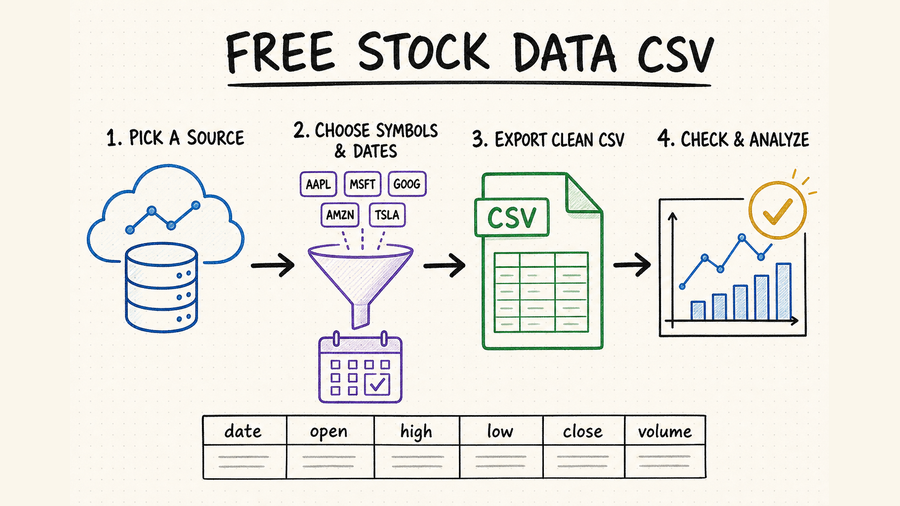
Free stock data CSV: quick summary
CSV is ideal for spreadsheets, notebooks, backtests, database imports, and one-off research without SDK setup.
Most files include date, open, high, low, close, adjusted close, and volume, with one row per interval.
Free does not mean unrestricted: confirm redistribution rights, delays, symbol coverage, and request limits.
Validate timezone, trading calendar, duplicates, missing rows, splits, dividends, and adjustment policy.
Stock CSV fields you should understand
A useful stock CSV has a stable schema, explicit interval, unambiguous timezone, and documented adjustment rules. Do not assume two providers define close or volume in exactly the same way.
Confirm whether rows use exchange time or UTC and whether the period is daily, minute, or tick data.
OHLC values describe the price range for each interval. Check whether prices are raw or adjusted.
Adjusted close may account for splits and dividends, but methodologies vary. It is useful for return calculations only when documented.
A ticker alone is not a permanent identifier. Preserve exchange and currency, and keep a stable instrument ID when the source provides one.
Check whether volume represents shares, contracts, or estimated activity. Empty cells, zero, NA, and null must not be treated as equivalent without a rule.
Detect comma versus semicolon delimiters, decimal points versus commas, quoted line breaks, byte-order marks, and UTF-8 before importing at scale.
Where to find free stock data CSV downloads
| Source type | Best for | Strength | Check first |
|---|---|---|---|
| Direct CSV download | Fast manual research. | No code or API key. | Freshness and license. |
| Market data API | Repeatable exports. | Symbols and dates are programmable. | Rate limits and pagination. |
| Exchange or regulator | Authoritative reference data. | Clear provenance. | Format and market scope. |
| Research dataset | Education and reproducibility. | Often ready for notebooks. | Update date and survivorship bias. |
For repeatable work, prefer a source that lets you request a fixed symbol, interval, and date range rather than exporting whatever a web screen currently displays. Save the request parameters next to the file, and record whether the export is a full snapshot or an incremental slice.
A reliable CSV download workflow
Write down market, symbols, date range, interval, currency, timezone, and whether prices must be adjusted.
Verify personal, commercial, and redistribution rights before building the data into a product or publishing a derived file.
Use UTF-8, ISO 8601 dates, stable column names, explicit null values, and one consistent sort order.
Test row counts, duplicates, missing sessions, split events, and extreme returns; retain the source URL and retrieval time.
Use symbol, interval, and timestamp as a candidate key, replace overlapping recent periods, and keep the latest retrieval as the winner only after validation.
Providers can revise historical bars. Keep immutable raw files or checksums so you can identify what changed instead of silently rewriting research inputs.
Use QVeris to find stock data capabilities
There is no single verified QVeris result for every CSV export workflow. When static files stop being enough, use the QVeris documentation to understand execution and the Playground to inspect repeatable data capabilities.
- Search by capability instead of guessing provider names.
- Inspect field schemas and provider constraints before integrating an endpoint.
- Move from manual CSV research to repeatable API calls when the workflow becomes recurring.
FAQ
Look for direct downloads, free API tiers, exchange data, regulator datasets, or research repositories. Always verify coverage and licensing.
A practical daily file includes date, symbol, open, high, low, close, adjusted close, and volume, plus currency and exchange metadata when needed.
Keep raw OHLC plus explicit split and dividend fields when possible. Add adjusted values as separate columns and document the adjustment method.
Fetch only a recent overlap, validate it, merge on a stable key, deduplicate deterministically, and write a new version before replacing the current file.
References and next steps
Stooq data download
Alpha Vantage API documentation
Twelve Data API documentation
Free Stock Data API Guide
QVeris Playground