
Free Stock API Key
Choose a provider, create a key, test a quote endpoint, and keep the credential out of browsers, apps, logs, and source control.
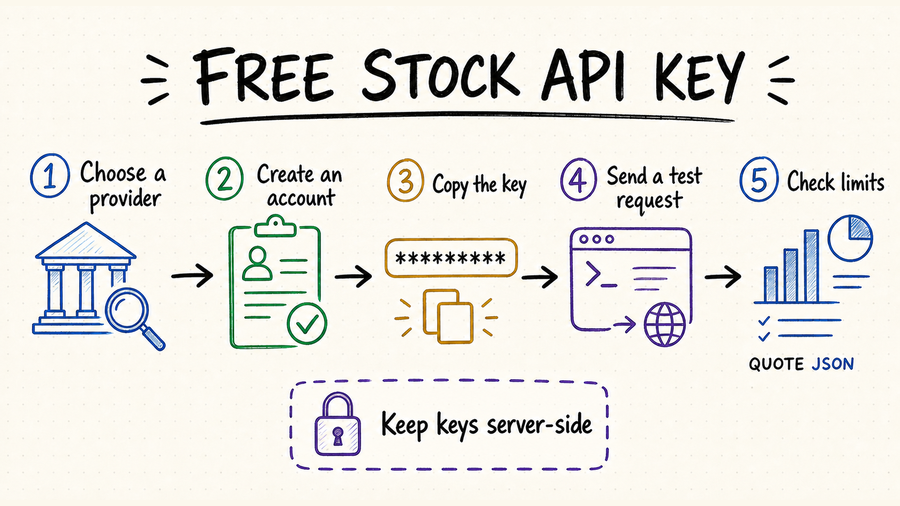
TL;DR
Create a provider account, verify your email, copy the generated key, and call one documented quote endpoint.
Check coverage, delay, request quotas, redistribution rights, and whether the free plan requires a card.
Keep the key in a server-side environment variable. Never commit it or expose it in client-side JavaScript.
How to choose a free stock API key provider
The word “free” describes billing, not fitness for your use case. Start with the exact market, instrument, freshness, and usage rights your application needs, then compare the limits that apply to those endpoints.
Confirm the provider supports your exchanges, symbols, ETFs, fundamentals, corporate actions, or historical candles—not just a single demo ticker.
A “quote” may be delayed, indicative, or end-of-day. Verify timestamps and exchange entitlements before using it in a live product.
Daily calls, per-minute bursts, rows per response, and endpoint credits can all become the real bottleneck.
Check whether you can create separate keys, revoke one without closing the account, restrict origins or IPs, and see recent usage. These controls matter as soon as a project leaves a local notebook.
Confirm how long responses may be cached and whether derived charts, alerts, or public displays are allowed. Authentication grants access; it does not replace a data license.
Make your first stock quote request
| Step | What to do | What to verify | Common failure |
|---|---|---|---|
| 1 | Create the key in the provider dashboard. | Key status is active and tied to the correct plan. | Email verification is incomplete. |
| 2 | Store it as STOCK_API_KEY on the server. | The value is available to the runtime, not the browser. | A placeholder or expired key is loaded. |
| 3 | Call the provider’s documented quote endpoint with a liquid symbol such as AAPL. | HTTP status, symbol, price, currency, and timestamp. | Wrong auth header or query parameter. |
| 4 | Log quota headers and handle 401, 403, 429, and 5xx responses. | Retries use backoff and never duplicate paid work. | Blind retry loops exhaust the free quota. |
After the first successful response, repeat the test with an invalid symbol, a missing key, and enough calls to approach the documented burst limit. Record the provider’s status code, error body, quota headers, and retry guidance. Your adapter should distinguish bad credentials from an unsupported endpoint, exhausted quota, and a temporary provider failure.
Keep a free stock API key secure
Load the credential at runtime and keep separate keys for local, staging, and production environments.
Browser JavaScript, mobile bundles, public notebooks, screenshots, and analytics events can all expose credentials.
Mask query parameters and authorization headers before requests enter logs, traces, or support tickets.
Load keys from a secret store, accept a new and old credential during a short transition, verify the replacement, and revoke the exposed or retired key promptly.
Use separate keys per project and environment when the provider permits it. Apply endpoint, referrer, or IP restrictions rather than sharing one unrestricted account credential.
Use QVeris to find the right stock data capability
A free API key belongs to its data provider; QVeris does not issue a universal stock-data key. Read the QVeris documentation for the execution model and use the Playground to inspect a candidate capability before supplying provider credentials.
- Search by capability—quote, historical candles, fundamentals, filings, or corporate actions—not only by provider name.
- Inspect authentication, input schema, response shape, freshness, and limits before an agent calls the tool.
- Keep one internal adapter so a provider or key can change without rewriting the whole application.
FAQ
Some providers allow it, while others require billing details. Check the current signup and pricing terms before creating an account.
Usually not by default. Confirm exchange entitlements, latency, SLA, and redistribution rights before any trading use.
Revoke or rotate it immediately, inspect usage for unfamiliar calls, remove it from logs and repository history, and fix the path that leaked it.
The key may be inactive, tied to another environment, sent in the wrong header, or missing entitlement for that endpoint. Check the provider’s error body before retrying.
References and next steps
Alpha Vantage API key
Finnhub API documentation
Twelve Data API documentation
Free stock data API guide
Best free stock APIs
QVeris Playground