
Free Options Volume API
What to Check First
Find a free API that returns usable contract-level options volume—and verify coverage, delay, limits, and history before you build.
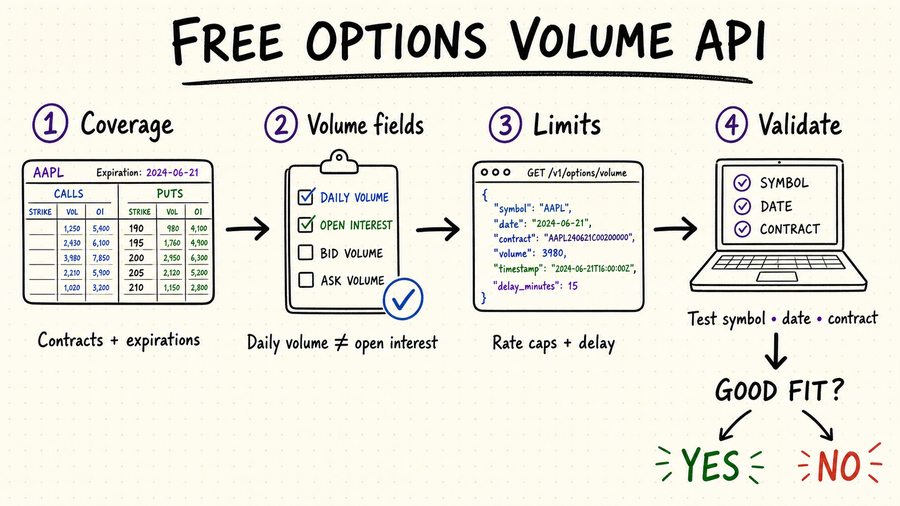
TL;DR
Expect delayed data, short history, small request quotas, limited symbols, or personal-use terms.
Volume counts contracts traded during a session. Open interest counts contracts still open.
A useful response identifies the underlying, expiration, strike, call or put, timestamp, and volume.
Check one liquid symbol, one thinly traded contract, multiple expirations, and a known market date.
What options volume data actually tells you
Options volume is the number of contracts traded during the measured session or interval. It can reveal unusual activity and liquidity, but it does not show whether traders opened or closed positions, and it does not replace open interest, quotes, or trade condition data.
Daily volume is enough for end-of-day screens. Alerts and live scanners need interval or trade-level updates with explicit timestamps.
Normalize OCC-style symbols or reconstruct contracts from underlying, expiration, strike, and option type.
A chain snapshot commonly reports session-to-date volume, while bars or trade aggregates report volume for one interval. Store the interval definition and never add repeated cumulative snapshots together.
Trade feeds may include conditions, cancels, and corrections that determine whether a print contributes to official volume. A simple count of raw messages can overstate activity.
Volume usually counts contracts, not shares or notional value. Keep the multiplier and option premium separately when deriving share-equivalent or dollar activity.
Free options volume data API checklist
| Check | What to verify | Why it matters |
|---|---|---|
| Coverage | US exchanges, symbols, expirations, strikes, calls and puts. | Partial chains create biased screens. |
| Freshness | Real-time, 15-minute delayed, or end of day; timestamp and timezone. | A strategy can be invalid if the delay is hidden. |
| History | Retention window, expired contracts, corporate-action handling. | Backtests need point-in-time contract data. |
| Free limits | Requests per minute and day, pagination, batch size, commercial terms. | A free plan may work for research but not a full-chain scanner. |
Quickstart: validate one response before scaling
Use a date with normal trading and select a liquid underlying such as SPY or AAPL so you can compare the returned chain with another source.
Confirm units, timestamps, timezone, pagination, null behavior, contract identifiers, and whether volume is cumulative or interval-based.
Session cumulative volume should generally not decrease unless the supplier applies a correction. Record source times and flag resets across sessions or unexpected reversals.
Count contracts by expiration and side, walk every page, and compare returned strikes with a contract-reference universe. A partial chain can create false unusual-volume rankings.
Compare volume with open interest, quote quality, spread, underlying move, contract age, and nearby strikes. Save the exact universe and ranking time with each result.
Calculate complete chains per refresh interval, then force rate limits, partial pages, and revised records. Keep immutable raw snapshots and version corrected normalized rows.
Use QVeris to discover callable data capabilities
The exact QVeris Options Chain Tool is a strong match because its public capability record explicitly includes contract volume and open interest alongside calls and puts by expiration and strike. Test one symbol in the Playground before assuming volume timing, history, full-chain coverage, or entitlement.
- Inspect one known symbol and expiration, then verify volume and open-interest types and null states.
- Record the tool ID, parameters, raw response, retrieval time, and chain-completeness result.
- Use the Free Options Data API Guide for broader provider and production checks.
FAQ
Some providers offer free tiers, trials, delayed endpoints, or limited datasets. Always verify current quotas, licensing, and exchange coverage.
Not by itself. Direction requires more context such as trade price versus bid and ask, side inference, open interest, and the strategy's other legs.
Not when volume is session cumulative. Compare the later value with the earlier one, while allowing for supplier corrections and session resets.
Use a complete contract universe and compare with history, open interest, spreads, quote quality, neighboring strikes, and the underlying move.
References and next steps
Cboe options statistics
Alpha Vantage options documentation
Polygon options API