
Free Options Data CSV
Find free options chains, export analysis-ready CSV files, and preserve the contract, quote, liquidity, and volatility fields that matter.
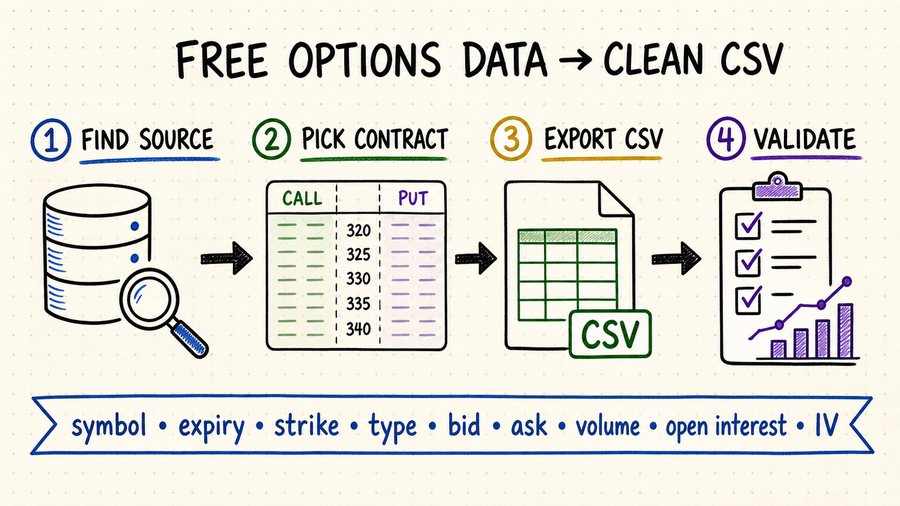
Free options data CSV: quick summary
CSV works well for chain screening, spreadsheets, notebooks, strategy research, and one-off snapshots without an SDK.
Keep the underlying, expiration, strike, call or put type, quote time, bid, ask, volume, open interest, and implied volatility.
Free sources often provide current or delayed chains, not complete historical quotes, Greeks, or every listed contract.
Validate timestamps, contract identifiers, crossed or zero quotes, duplicate rows, stale prices, and missing expirations.
Options CSV fields you should keep
An options row is meaningful only when the contract and quote context travel together. A price without expiration, strike, option type, and timestamp cannot identify a tradable contract reliably.
Store underlying symbol, expiration date, strike, call or put type, and the provider's contract symbol when available.
Keep bid, ask, last price, quote timestamp, exchange timezone, and delay status. Mid-price is derived, not an observed trade.
Volume, open interest, bid size, ask size, and spread help distinguish active contracts from stale or unusable quotes.
Keep multiplier, deliverable, root symbol, currency, exercise style, settlement style, and adjustment status so non-standard contracts are not mixed with standard listings.
Add supplier, dataset name, retrieval time, market date, quote time, trade time, open-interest date, analytics time, and delay class. One generic timestamp is not enough.
For midpoint, spread, IV, and Greeks, preserve the method, inputs, calculation time, and model version. Leave source facts unchanged.
Where to find free options data CSV files
| Source type | Best for | Strength | Check first |
|---|---|---|---|
| Broker chain export | Manual screening. | Easy current-chain access. | Account terms and delay. |
| Options data API | Repeatable CSV exports. | Programmable symbols and expiries. | Rate limits, paging, and entitlements. |
| Exchange delayed chain | Reference and discovery. | Clear market provenance. | Download format and reuse rights. |
| Research dataset | Teaching and reproducibility. | May include historical snapshots. | Coverage, age, and survivorship bias. |
A reliable options CSV workflow
Specify underlying symbols, expiration range, strike window, call or put coverage, quote time, and whether you need current or historical data.
Verify delays, exchange entitlements, personal or commercial use, retention, and redistribution rules before collecting files.
Use UTF-8, ISO 8601 timestamps, numeric strikes, explicit nulls, stable field names, and one row per contract snapshot.
Record supplier, endpoint or file URL, parameters, retrieval time, timezone, expected expirations, row count, checksum, schema version, and applicable license beside each CSV.
Check duplicate contract-time keys, malformed symbols, missing expirations, crossed quotes, negative values, unexplained multiplier changes, and rows that mix timestamps.
Partition by supplier, market date, underlying, and observation type. Preserve immutable raw exports; write cleaned and derived files to separate versioned locations.
Choose a wide or long CSV deliberately
A wide row is convenient for a one-time chain screen, but quote, trade, open-interest, and analytics fields can represent different clocks. For repeated collection, a long event-oriented layout or separate contract, quote, daily, and analytics files usually preserves updates more faithfully. Document the grain in the manifest so downstream users know exactly what one row means.
Prevent spreadsheet tools from corrupting identifiers
Contract symbols, leading zeros, ISO dates, large sequence numbers, and null markers can be auto-converted when a CSV opens. Import columns with explicit types, retain the original text identifier, use a period for decimal values, and never save a manually opened raw export over the source file.
Use QVeris to find options data capabilities
The exact QVeris Options Chain Tool is the strongest verified starting point. Its public record includes calls and puts by expiration and strike with last price, bid, ask, volume, and open interest. Inspect one response in the Playground, then map the actual nested fields into a versioned CSV schema rather than assuming a flat export.
- Test one symbol and expiration in the QVeris Playground and save the raw response.
- Define the CSV grain, column types, null policy, and manifest before scheduling exports.
- Record the tool ID, parameters, retrieval time, schema version, checksum, and validation result.
FAQ
Try broker exports, exchange delayed chains, provider free tiers, or research datasets. Verify contract coverage, delay, retention, and licensing.
Keep underlying symbol, expiration, strike, option type, quote timestamp, bid, ask, volume, open interest, and implied volatility.
No. Calls and puts are separate contracts, and quotes, trades, daily fields, and calculations can have different source times.
Store a checksum, byte size, row count, retrieval metadata, and immutable raw copy in a sidecar manifest.
References and next steps
Cboe delayed quotes
Historical Option Data samples
Alpha Vantage options documentation