
Free Most Active Stocks API
Build a most-active stocks feed with an explicit activity metric, eligible universe, session, snapshot time, liquidity controls, and market-data entitlement. Compare share volume, dollar volume, trade count, turnover, and unusual-volume rankings without treating them as interchangeable.
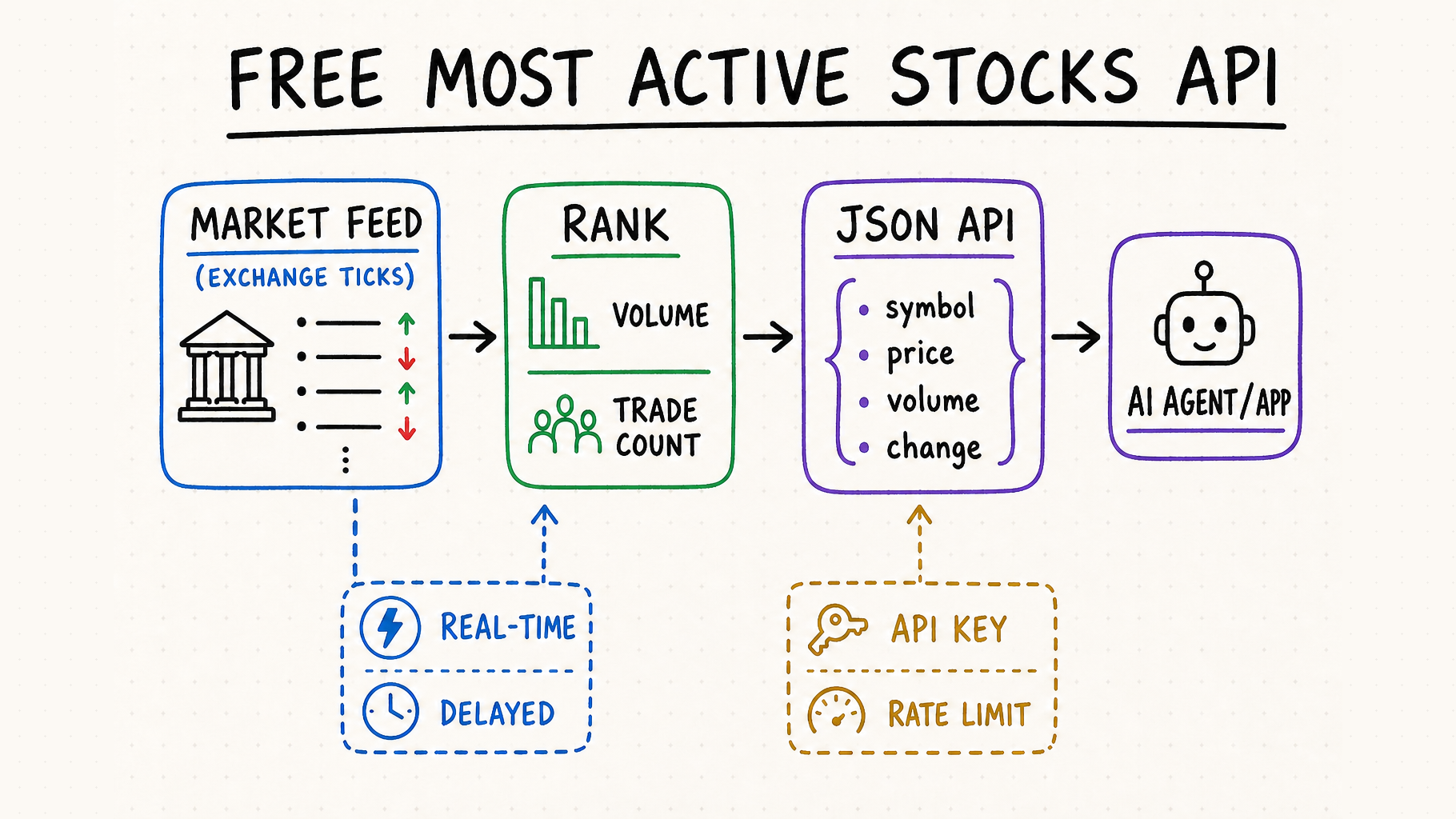
TL;DR
Name the ranking metric
Share volume favors low-priced securities; dollar volume favors traded value; trade count favors message activity. The response should state which metric produced the rank.
Define the accumulation window
Session-to-date, rolling window, premarket, after-hours, and completed-day volume are different quantities. Return start, end, timezone, and snapshot time.
Control the security universe
Common shares, ETFs, ADRs, warrants, units, OTC securities, halted names, and low-priced stocks can produce very different leaderboards.
Disclose freshness and rights
A free endpoint may use delayed or partial feeds. Preserve exchange coverage, entitlement, provider timestamp, quota, and display or redistribution terms.
How a free most active stocks API ranks market activity
“Most active” normally means the highest share volume or the largest number of trades during a defined session. It is not the same as top gainers, top losers, unusual volume, or trending tickers. A useful API states the ranking field, market universe, session, timestamp, and whether its feed is real-time or delayed.
The ranking also needs a denominator or baseline when it claims relative activity. Relative volume may compare current volume with a time-of-day profile, an average full-day volume, or a trailing period; turnover divides volume by shares outstanding or float. Without the exact baseline date, window, adjustment policy, and share denominator, these values cannot be reproduced.
Most active stocks by volume API
Ranks symbols by shares traded. This is the most common interpretation and is useful for liquidity screens and market dashboards.
Most active stocks by trade count API
Ranks symbols by completed transactions. It can produce a different list because many small trades and fewer large trades are not equivalent.
Real-time vs delayed market movers API
Real-time data is important for intraday workflows. Delayed or end-of-day data can still work for demos, research, and scheduled summaries.
Most active by dollar volume
Price multiplied by traded shares reduces the low-price bias of share-volume rankings and is useful for measuring deployed trading value. Confirm whether the provider sums actual trade notionals or approximates with a snapshot price.
Unusual or relative volume
Compares current activity with a historical baseline. It finds deviations rather than absolute leaders, so the lookback, time-of-day adjustment, minimum history, and corporate-action handling are part of the metric.
Free stock market API comparison checklist
| Check | What to verify | Why it matters | Reject when |
|---|---|---|---|
| Free access | Permanent tier, sandbox, trial, credit card, daily and per-minute quotas. | “Free” plans have different production limits. | Pricing or limits are undisclosed. |
| Freshness | Real-time SIP/exchange feed, delayed minutes, or end-of-day only. | Determines whether intraday decisions are safe. | Timestamps or delay are missing. |
| Ranking | Volume, trade count, relative volume, turnover, and top parameter. | Prevents mixing different definitions of activity. | The metric is ambiguous. |
| Response | Symbol, price, volume, trades, change, timestamp, errors, and pagination. | Stable JSON reduces integration work. | Fields are undocumented or unstable. |
| Universe | Exchanges, common stock, ETFs, ADRs, warrants, units, OTC, halted and delisted symbols. | Explains why low-priced or non-common instruments dominate a list. | Security types and filters cannot be inspected. |
| Window | Session start/end, timezone, rolling or cumulative method, and reset behavior. | Makes rankings reproducible across premarket, regular, and after-hours sessions. | Only a vague “today” label is returned. |
| Quality controls | Minimum price, share or dollar volume, stale-quote rule, corporate-action adjustment, and tie handling. | Prevents noisy or mechanically distorted leaders. | Ranks change without documented filters. |
Most active stocks API options: ready-made list or custom ranking?
A ready-made endpoint is the fastest route to a market widget, but it gives the provider control over the eligible universe, session window, ranking metric, and exclusions. Building the list from market snapshots takes more data and quota, yet lets the application define common shares only, minimum price, regular hours, dollar volume, or another reproducible rule.
| Candidate | Documented behavior | Best fit | Boundary to verify |
|---|---|---|---|
| Alpha Vantage | TOP_GAINERS_LOSERS returns top 20 gainers, losers, and most actively traded U.S. tickers. The default result is updated at the end of the trading day. | Free-key evaluation, daily market recaps, research notebooks, and products that do not need an intraday leaderboard. | Real-time and 15-minute delayed access are documented as premium. Confirm whether the returned universe, metric, security types, and commercial rights match the product. |
| Alpaca | The Market Data API publishes a dedicated /v1beta1/screener/stocks/most-actives endpoint with a ranking-metric parameter. | Broker-linked dashboards or trading workflows that already use Alpaca symbols, authentication, and market-data feeds. | Check which feed and subscription serve the endpoint, whether results are indicative or OPRA/SIP-derived where relevant, update cadence, exchange coverage, and display rights. |
| Financial Modeling Prep | FMP documents a Market Most Active endpoint that ranks stocks with the highest trading volume; its cycle-time page lists a 15-minute refresh cadence. | Applications already using FMP quotes or market-performance endpoints and wanting a provider-built intraday list. | Public documentation does not prove free-plan access. Verify current subscription, region and exchange scope, row limit, ranking definition, latency, and redistribution terms. |
| Custom ranking from snapshots | Retrieve a synchronized market snapshot or full-universe aggregate dataset, apply the eligible universe, then sort by shares, notional value, trades, or relative volume. | Products that need common-stock-only results, dollar-volume ranking, custom sessions, explainable filters, or a stable historical definition. | Confirm that the data source can cover the entire universe at one comparable snapshot time within quota. Per-symbol polling produces biased rankings when the market moves during collection. |
A fair side-by-side leaderboard test
At three fixed times—shortly after the regular open, midday, and after the closing auction—save the provider response and the underlying snapshot used for a local rank. Normalize symbols, remove the same excluded security types, and compare the top 20 by the provider's stated metric. Record overlap, rank correlation, missing symbols, stale timestamps, ties, and whether late volume revisions change the completed-day list. A disagreement is not automatically an error; it becomes actionable when the universe, time window, or metric cannot explain it.
How to get most active stocks data with an API
1. Define the activity metric
Choose volume or trade count, the eligible exchange universe, regular or extended hours, and how many symbols your app needs.
2. Inspect the free tier
Confirm the endpoint is included, obtain an API key if required, and record per-minute and daily limits before writing production code.
3. Validate the JSON response
Check types and timestamps for symbol, price, volume, trades, and change. Handle 401, 403, 429, and 5xx responses explicitly.
4. Cache and disclose freshness
Cache within the provider’s rules, display the source timestamp, and label delayed data so users and agents do not treat it as real-time.
5. Recompute ranks from returned metrics
Apply the same eligible-universe and liquidity rules, then sort by the stated metric. Check monotonic ordering, duplicates, missing symbols, negative volume, stale snapshots, and whether dollar volume or relative volume can be reproduced.
6. Test session transitions and recovery
Observe pre-open emptiness, the regular-session reset, closing-auction volume, after-hours updates, holidays, halts, and late corrections. Resume after a simulated 429 or outage without merging snapshots from incompatible sessions.
Use QVeris to connect a stock movers API to agents
QVeris can help an agent discover a capability for share-volume leaders, dollar-volume leaders, trade-count leaders, or unusual-volume screens. Before calling it, the agent should declare the market, security types, session, metric, lookback or accumulation window, filters, result count, entitlement, and freshness tolerance. Provider terms still apply, and a delayed feed must remain labeled delayed throughout the workflow.
- Open the QVeris Most Active tool details to review the exact list and session.
- Inspect required parameters, provider identity, freshness, and output fields before an agent calls the capability.
- Add validation, rate-limit handling, source timestamps, and a fallback path to the surrounding workflow.
FAQ
Is there a free API for most active stocks?
Some providers offer a free tier, sandbox, or trial. Availability, quotas, real-time access, exchange coverage, and licensing vary, so verify current provider terms.
How are the most active stocks calculated?
They may be ranked by share volume, dollar volume, trade count, turnover, or activity relative to history for a specified session. The metric, universe, window, filters, and snapshot time are all part of the calculation.
Can I get real-time most active stocks data for free?
Sometimes, but free real-time coverage may be limited by exchange, feed, symbol set, usage rights, or request quota. Never infer real-time status from the word “free.”
What fields should a most active stocks API return?
At minimum: stable security identity, symbol, rank, metric name and value, price, volume, timestamp, timezone, session, exchange, entitlement, and freshness. Relative metrics also need baseline window and denominator.
Is most active the same as top gainers?
No. Most active measures trading activity; top gainers ranks price increases. A highly active stock can rise, fall, or remain nearly unchanged.
How do I handle free API rate limits?
Cache results, poll no faster than the data refresh interval, honor 429 responses, use exponential backoff, and avoid per-user duplicate requests.
Why does share volume favor low-priced stocks?
The same dollar amount purchases more shares at a lower price, so share-count rankings can elevate inexpensive securities. Dollar volume, price floors, or security-type filters can reduce this bias when that matches the use case.
What is unusual volume?
It compares current volume with a historical or time-of-day baseline rather than ranking absolute activity. Require the lookback, intraday adjustment, minimum history, and corporate-action policy before using it.