
Context7 MCP Claude Code Guide
Ground Claude Code with Context7 MCP documentation: confirm library and version, check sources, and test code against installed dependencies.
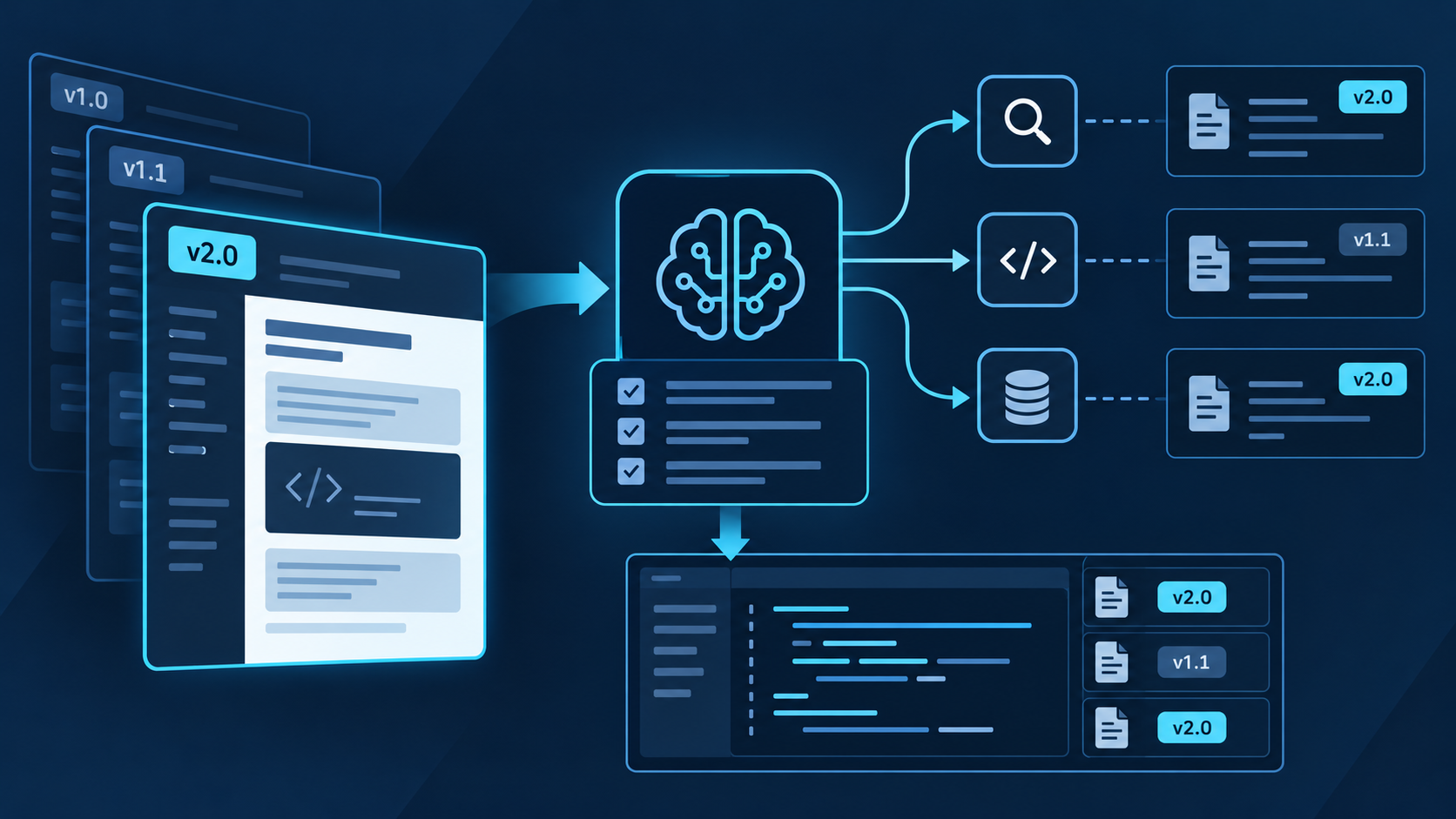
Context7 MCP in Claude Code, in brief
Context7 retrieves current library documentation and examples so Claude Code does not rely only on model memory for fast-changing APIs.
Use it before implementing with a named package, especially when syntax, configuration, or behavior differs by version.
Confirm the resolved package, requested version, cited documentation, and the final code against your installed dependencies.
Retrieved documentation does not prove your repository assumptions, package resolution, generated code, compilation, tests, or runtime behavior.
Context7 is a documentation-grounding layer, not a general web search engine or code validator. Claude Code can use it to resolve a library and retrieve focused, version-sensitive documentation before planning or editing. The reliable pattern is: identify the installed dependency, resolve the exact library, retrieve one narrow topic, cite the relevant guidance, make the smallest repository change, and verify locally. If the resolved project or version is wrong, stop and correct the lookup before generating code.
How the documentation grounding loop works
Claude Code first inspects repository evidence such as package.json, lockfiles, manifests, imports, and existing configuration. Context7 then resolves the library identity and retrieves pages for one selected topic. Claude compares that context with the installed version, proposes a change, edits only approved files, and runs repository checks. This order prevents a broad documentation result from overriding facts already present in the codebase.
Name the dependency exactly and include the version from your lockfile when behavior may have changed. Ask Claude Code to report which documentation source Context7 resolved.
Request a short documentation-backed plan before file changes. The plan should separate facts found in docs from assumptions inferred from your repository.
Ask one concrete question about a method, configuration option, migration, or framework pattern. Include runtime, language, and target artifact. Avoid “give me everything about React” requests that dilute useful context.
Check package name, installed version, module format, framework mode, configuration conventions, and existing abstractions. Record where the docs match and where the repository imposes additional constraints.
Make the smallest approved change, then run type checking, linting, unit or integration tests, build checks, and a focused runtime test. Documentation grounding reduces guesswork; only repository evidence verifies the implementation.
Choose the right task for Context7
| Task | Use Context7 for | Also inspect | Stop condition |
|---|---|---|---|
| API usage | Current signatures, options, return types, and examples. | Installed version, types, wrapper code, and tests. | Resolved library or version does not match. |
| Framework configuration | Supported keys, file locations, modes, and migration notes. | Existing config, build tool, environment, and deployment target. | Documentation assumes another router, runtime, or major version. |
| Version migration | Breaking changes, replacement APIs, and upgrade sequence. | Changelog, lockfile, peer dependencies, codemods, and CI. | The source does not cover both current and target versions. |
| Error diagnosis | Documented constraints and correct configuration patterns. | Exact stack trace, reproduction, source code, and runtime logs. | No evidence links the error to the retrieved topic. |
| Repository-specific behavior | Only the external library contract. | Local source, architecture decisions, tests, and git history. | The answer depends mainly on private code rather than library docs. |
Configure Context7 MCP and make requests precise
The current official route is npx ctx7 setup --claude. It authenticates through OAuth, creates or selects an API key, and lets you choose CLI + Skills or MCP mode. The Context7 CLI requires Node.js 18 or newer. For a remote server, headless VM, or SSH session where the browser cannot return to the same machine, pass an existing key with --api-key through a secure interactive or secret-managed process.
| Step | Action | Best for | Boundary |
|---|---|---|---|
| Set up | Run npx ctx7 setup --claude, authenticate, and choose CLI + Skills or MCP. | The supported guided route for Claude Code. | Review generated files and keep API keys out of version control. |
| Plugin | Add the Context7 marketplace and install context7-plugin@context7-marketplace. | Skills, a docs-researcher agent, and the /context7:docs command. | Install only from the official Upstash marketplace source. |
| Manual MCP | Use https://mcp.context7.com/mcp with remote HTTP; add the API key through supported secure headers when needed. | Controlled manual configuration or clients outside the setup flow. | Do not embed keys in a shared URL or committed JSON. |
| Prompt | Name the package, version, question, and expected artifact; explicitly ask to use Context7. | API migrations, configuration, framework patterns, and unfamiliar SDK methods. | Broad prompts can retrieve irrelevant documentation or the wrong package. |
| Verify | Compare the answer with package metadata, lockfiles, tests, and cited documentation. | Every code change that depends on version-specific behavior. | Retrieved context improves grounding but does not replace repository tests. |
Verify installation before relying on retrieved docs
For MCP, inspect claude mcp list, claude mcp get context7, and /mcp. For the plugin, confirm the marketplace, plugin status, available skill, docs-researcher agent, and /context7:docs command.
Choose a dependency already pinned in the repository and ask one version-specific question. Require Claude to state the resolved Context7 library identity, requested topic, and the documentation facts used.
Confirm the installed version from the lockfile and types, then test a small example. A successful tool response is not enough if it resolved another package with a similar name.
If Context7 is registered but unavailable, inspect claude mcp logs context7, Node.js availability, proxy or TLS restrictions, API-key state, and the selected setup mode before reinstalling.
Prompt pattern: “Inspect the lockfile and identify the exact installed version of [package]. Use Context7 to resolve that library and retrieve documentation only for [topic]. Report the resolved library, version coverage, documented facts, and any mismatch with this repository. Propose a minimal change, then stop before editing.”
Where QVeris fits beside Context7 MCP
Context7 specializes in library documentation. QVeris Tool and Provider searches currently return no exact Context7 record, so use QVeris Docs and the Playground only when a task extends into a separate external capability.
- Use Context7 for current package documentation and version-sensitive examples.
- Use QVeris only for a separate capability returned by current discovery; inspect the provider, schema, constraints, and cost first.
- Preserve approval points between retrieved documentation, repository mutation, external calls, and any data written back.
FAQ
No. It improves the documentation available to Claude Code, but package resolution, repository assumptions, compilation, tests, and runtime behavior still require verification.
Use user scope for your own recurring workflow. Prefer project scope when teammates need the same server definition, while keeping credentials outside committed files.
MCP gives Claude native documentation tools. CLI + Skills can keep the tool surface and context more focused. Use the guided setup to choose, then verify the installed mode.
Basic use may work without one, while a free key provides higher limits and is needed for private repositories. Store it outside version control and rotate it if exposed.
Provide the exact package name, ecosystem, version, and topic. Inspect the resolved library identity before accepting docs or generated code.
Check Claude MCP logs, Node.js, network and TLS rules, API-key state, server configuration, and session reload before reinstalling.
References and next steps
Context7 Claude Code guide
Context7 repository
Claude Code MCP documentation